Cloudflare Review: A Comprehensive Guide

Cloudflare launched in 2010 offering a variety of features under the free plan. Over the years they continued to innovate and introduced new features. I have been personally using Cloudflare’s free plan for about 3 years and this post is written with the perspective of a free user.

What is Cloudflare?

Cloudflare acts as a middleman between your web application and your visitors. When you turn Cloudflare off, it simply acts as a DNS. In fact, on this year’s april’s fool, they decided to introduce 1.1.1.1 – the fastest public resolver according to dnsperf.com.

Since they are in the middle, they are actually a reverse proxy that acts as an CDN.

Content Delivery Network

A Content Delivery Network (CDN) is a network of caching servers located around the world. We first need to understand why are CDNs needed. A website is made up of many resources such as your texts, images, CSS files and javascript files. When you visit a site, the contents don’t magically appear, instead, your browser has to fetch these content which is located somewhere on the internet.

Here is an example of the resources for the homepage of this blog:
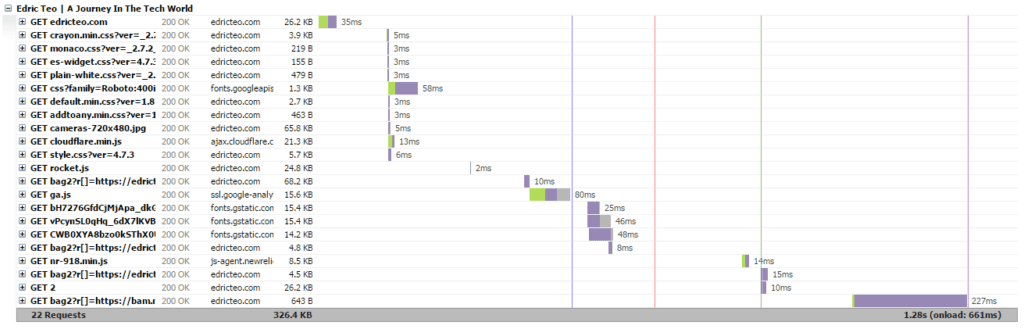
As you can see there are quite a number of resources for your browser to fetch before you could view this site as intended. For this blog, most of the files are located on the web server itself, therefore, every time you reload the site, your browser fetches all these resources from the server itself (assuming you do not have cache version on your browser).

Imagine you are from the United States and everytime you browse this blog, your browser has to go through the effort of getting the resources from the web server which is located in Singapore. The time it takes for the data to transmit from the web server to your browser is known as latency.

The objective of a CDN is to reduce the latency by bringing the resources closer to you.
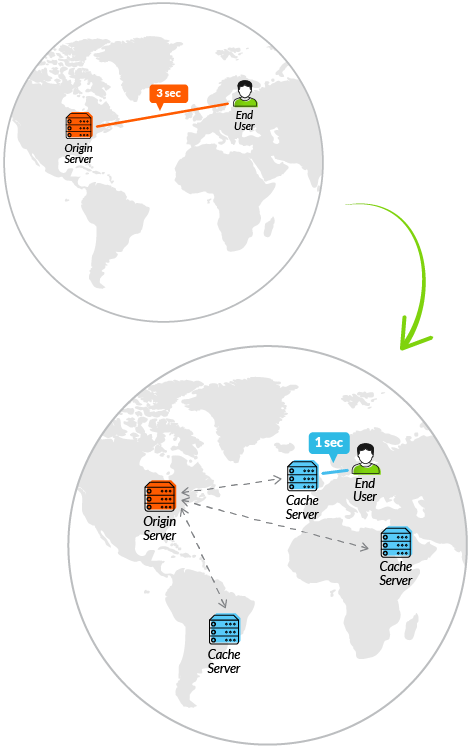
Source: https://www.incapsula.com

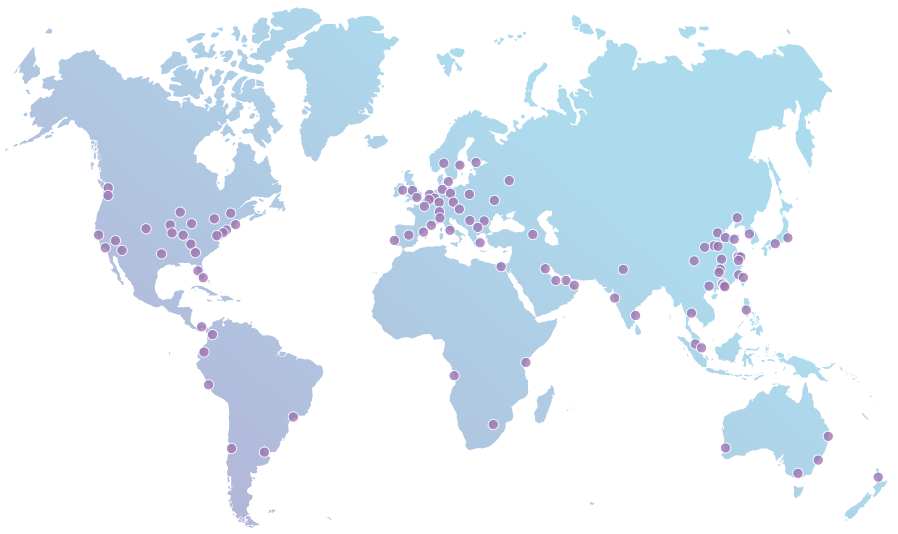
In order to achieve that, caching servers are located in different locations around the world also known as points of presence (PoPs).

Here is an image of Cloudflare’s PoPs:
A typical CDN requires you to push your resources to these caching servers. However as mentioned earlier, Cloudflare is not a traditional CDN. It acts as a proxy which allows their server to cache your resources.

Domain Name System

Cloudflare must be the one handling your DNS queries. With that said, you should note that since they act as a proxy, they are able to read all your traffic. Even when you have SSL on, Cloudflare will decrypt the traffic on their server and re-encrypt them using the certificates located on their edge servers.

Nevertheless, they provide a beautiful interface which is easy to use and it updates almost instantly.

Security

Secure Sockets Layer(SSL)

Secure Sockets Layer (SSL) is a tunnel which ensures that your traffic is encrypted. In 2014, Cloudflare launched their universal SSL which provides security for their user.

There are 3 types of options:

Flexible SSL:

Flexible SSL means that the encryption only occurs between Cloudflare’s edge server and your visitor’s browser. This gives your site the green padlock making your site “look” secure but in fact, the traffic between their server and your web server is fully unencrypted.
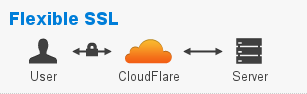
Full SSL:

Full SSL means that there is full encryption from your browser to Cloudflare’s edge server to your web server. However, when this option is enabled Cloudflare will not verify the authenticity of your SSL certificate. Hence you could have a self-sign certificate in the web server and no error will be prompted.
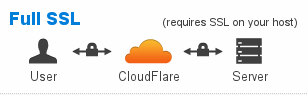
If you were to host your site on a shared web server, then anyone sharing that server with you is able to self-sign a certificate and theoretically decrypt the traffic.

Full SSL(Strict):

This option is the recommended as Cloudflare will validate your certificate. In order to have a valid certificate, you have to get it from a Certificate Authority(CA). Let’s Encrypt is one of the most popular CA which provides free SSL certificates. If you are using shared hosting, most service providers have also integrated Let’s Encrypt into their CPanel and you will be able to get the whole process done in a few clicks.
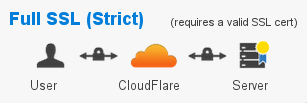
Why do you need SSL?

In the 2014, Google announced on their webmaster blog that one of the ranking signals would be HTTPS. If you are a business then this should be something to take note of.

Here is the exact quote from Google:

For now it’s only a very lightweight signal — affecting fewer than 1% of global queries, and carrying less weight than other signals such as high-quality content — while we give webmasters time to switch to HTTPS. But over time, we may decide to strengthen it, because we’d like to encourage all website owners to switch from HTTP to HTTPS to keep everyone safe on the web.

-Google, 2014

In September 2016, Brian Dean, an SEO expert conducting an experiment in which they analyzed 1 million google search results and they found out that there is a correlation between high ranking sites and those using HTTPS. Here take a look at this graph from Backlinko:
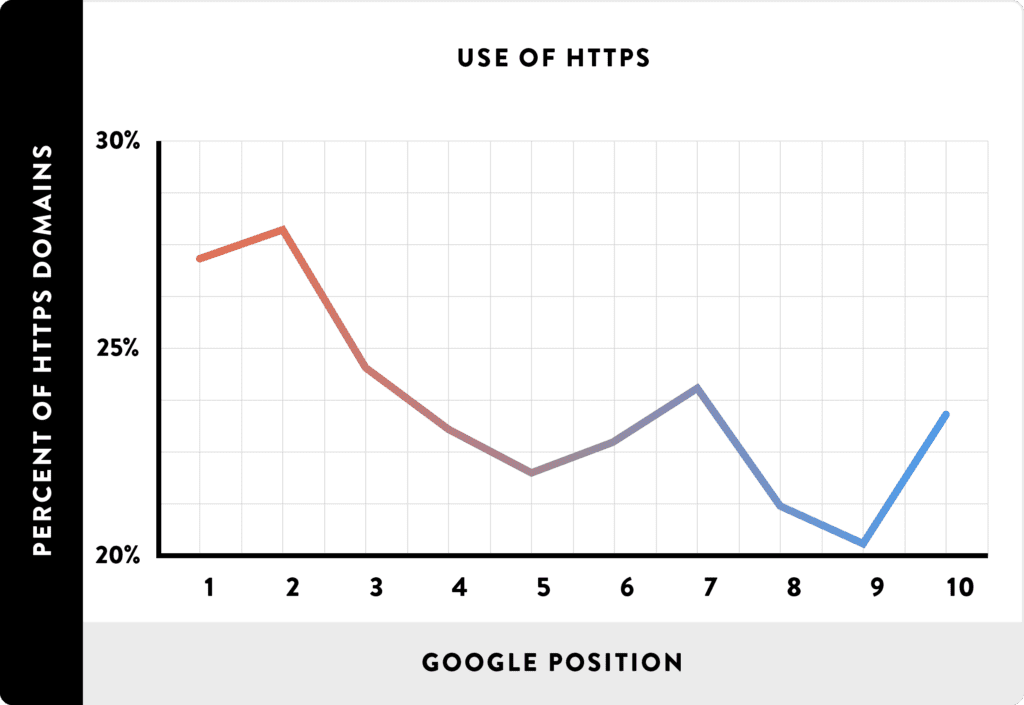
Source: http://backlinko.com/search-engine-ranking

In July 2018, Google Chrome 68 marks all website without SSL as insecure. The trend is clear. Get on the HTTPS trend, or be left out – yes, even for static sites. You can read Troy Hunt’s blog on why even static sites need HTTPS.

I’m Under Attack!

Cloudflare offers DDOS protection for free users with this I’m Under Attack! mode. What it does when this mode is activated, is that it directs the user to an interstitial page for approximately 5 seconds. During the 5 seconds, Cloudflare analyzes the traffic to determine if it is malicious. If determined as the latter, the user will be redirected to a captcha page to solve the challenge. Upon solving the challenge the user is given a cookie so that Cloudflare is able to let the user pass the check in the future.

With that said, it also means that javascript and cookies must be enabled in order or this mode to work.

Recently, one of the websites I managed was a victim of bad bots. They drained huge amount of bandwidth which cost money. I’ve actually mitigated it using this mode.

It is also important to note that there are articles and tools out there which demonstrate the bypassing of this mode.

Rate Limiting

Rate limiting was released as a beta before releasing to the public in April 2017. It aims to mitigate Layer 7 DDOS attack which is also known as the application layer. Application layer consists of the web application itself as well as additional services provided such as API endpoints.

You can enable Cloudflare’s rate limit by navigating to the Firewall option in the menu.
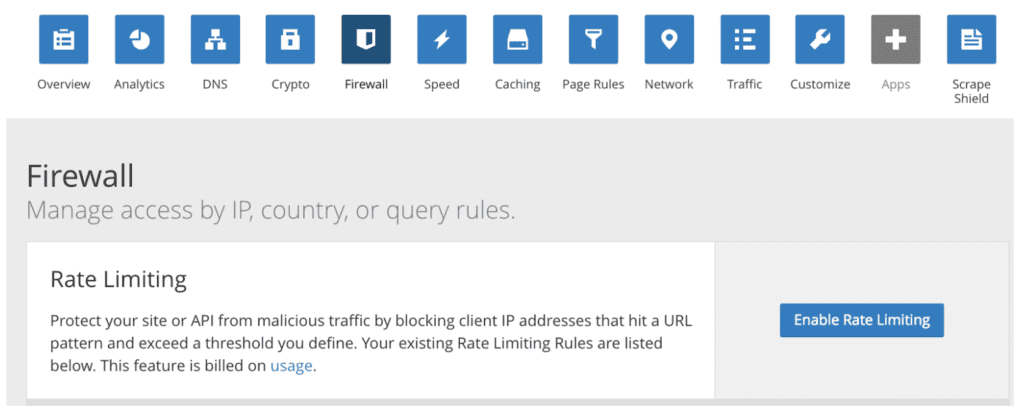
Even though this post was for free user, this is a feature I feel that requires attention and could be useful for real world application.

This is an example of the free rate limiting interface:
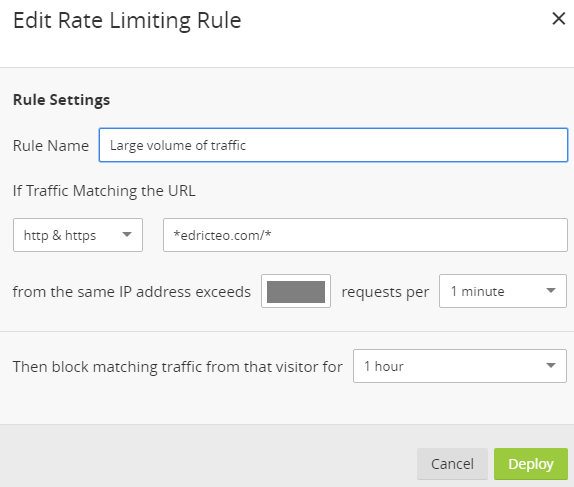
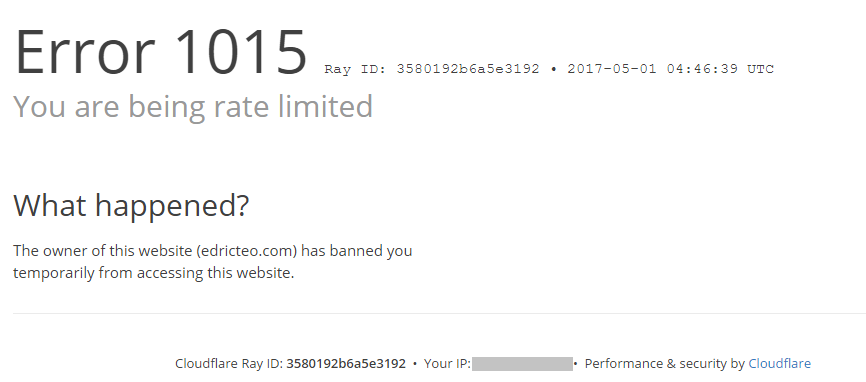
As you can see from the above image, free users can only block traffic. Anyone who exceeds the number of requests you specified will be shown this message:
IP Firewall

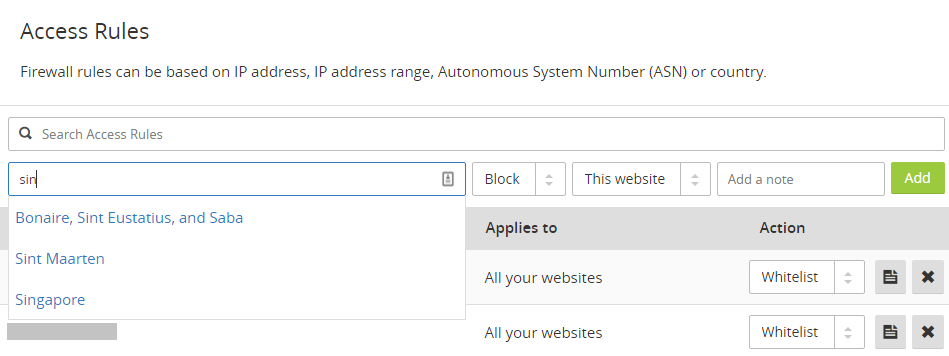
IP Firewall is a way of controlling access to your website.

You can set the rules based on IPv4 addresses (range), IPv6 addresses (range), Country (either by name or by code) and ASN (autonomous system number**).**

In addition, you also have the ability to control users who are accessing your site using Tor.
Automatic HTTPS Rewrites

Occasionally, you may get Mixed Content errors whereby the browser warns you that you are loading resources insecurely.
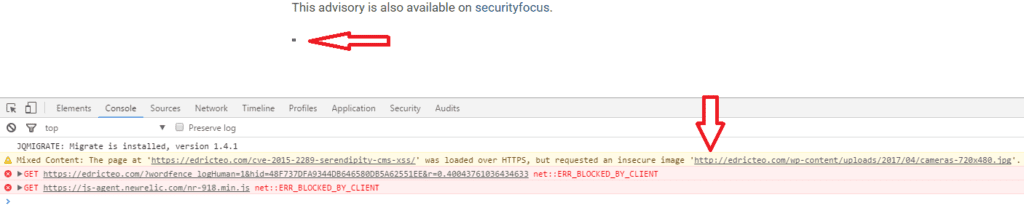
I intentionally force the browser to load an insecure resource by hard coding the URL as seen above (the small dot is an image file of 5×5). However, I wasn’t getting the expected result even after turning on this feature.

I contacted Cloudflare to clarify and it turns out that they rely on HTTPS Everywhere and Google Chrome’s HSTS preload list.

This means that in order for this to work, you will have to send a pull request to HTTPS Everywhere Github’s repository. Note that the above example is an insecure resource from my own domain hence I would be the one submitting the request. Should the insecure resource be from other domain, then the domain owner would be the one submitting the pull request.

Speed

Auto Minify

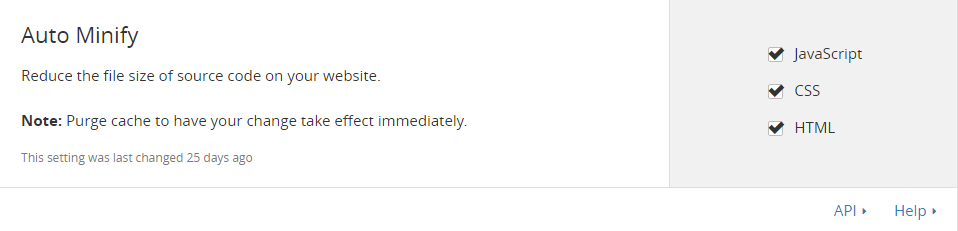
As mentioned in the CDN section, every resource has to be fetched before presented in your browser. This feature reduces the file size by removing whitespace in your Javascript, CSS and HTML files. It could be activated by clicking on the checkbox:
Rocket Loader™

The purpose of this feature is to bundle upload the javascript after window.onload. This way, your website will render as normal and only load the scripts after the website is rendered.

There are two options to this feature.

Automatic

Automatic allows Cloudflare to handle which scripts to load after window.onload and no configuration is required on the web master’s side. However, by selecting this option some people may encounter issues.

If you are able to single out the cause of the issue, then you could exclude the script from Cloudflare by adding this attribute data-cfasync=”false” to that script.

An example would be something like this:


with the option set to Automatic.

Manual

Manual, on the other hand, requires the webmaster to add this attribute **data-cfasync=”true” **into every script.

An example to include the script would be:


with the option set to Manual.

I used to turn off this feature in the past because it causes error. However in 2018, when I switched it on by accident, it didn’t cause any error like it used to. The flow of resources were loaded in the order they were supposed to.

Mobile Redirect

Cloudflare offers the redirecting of your audience to a mobile friendly site if Cloudflare detects they are using a mobile device. According to Cloudflare, this is done on the edge server to prevent the request from reaching your origin server, and thereby increasing the speed.

This is useful if you have specially created a version for mobile devices.

However, you should note that web application these days should be developed to be mobile friendly and should resize based on device screen size. You can check this on your desktop by entering the developer console and clicking the icon shown in the image below.
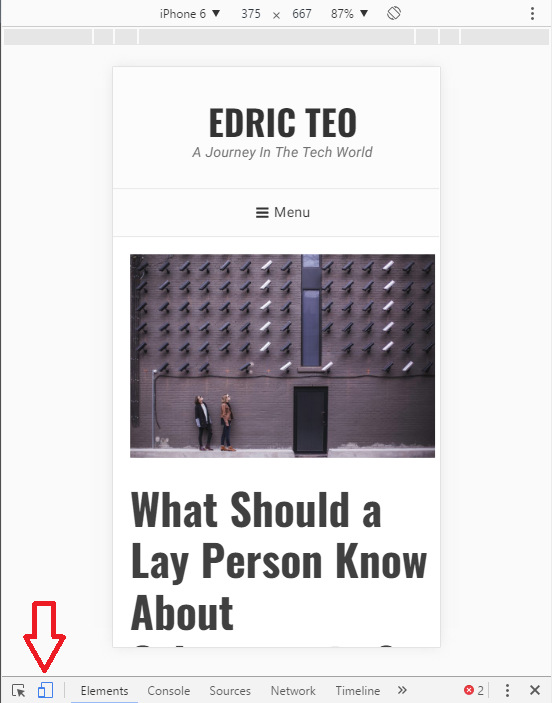
You can check this on your desktop by entering the developer console and clicking the icon shown in the image below.

Your responsive website should resize to the phone’s resolution which can be set at the top.

Page Rules

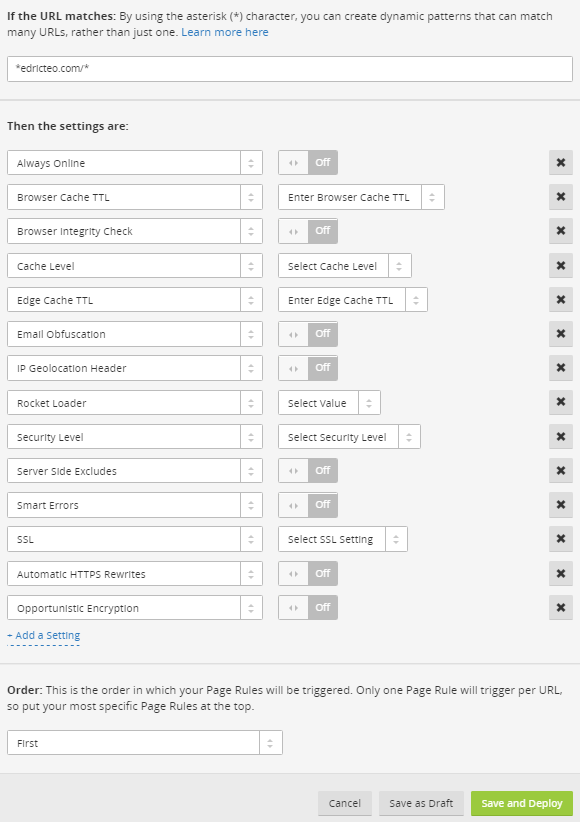
Page rules is probably the best and versatile feature Cloudflare could offer. It includes forcing HTTPS to the different types of caching level.

Here is a list of options page rules offer:
Setting up Cloudflare

Setting up of Cloudflare is pretty straight forward. If you are using hosting sites, there is a chance that Cloudflare is integrated right into your hosting. All you have to do is head over to your Cpanel and look for the Cloudflare logo. If Cloudflare isn’t showing up in your Cpanel, you will have to do this manually.

Sign up and head over to https://www.cloudflare.com/a/overview. Click on +Add site located at the top right of the page.

Enter your domain
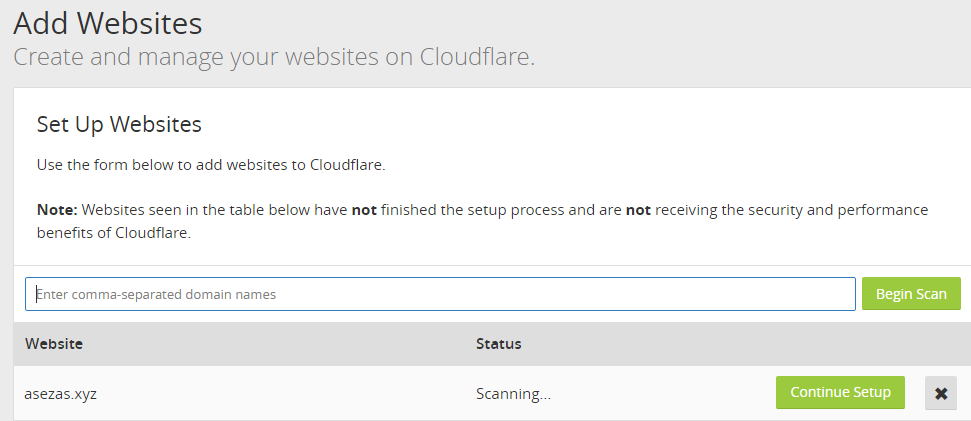
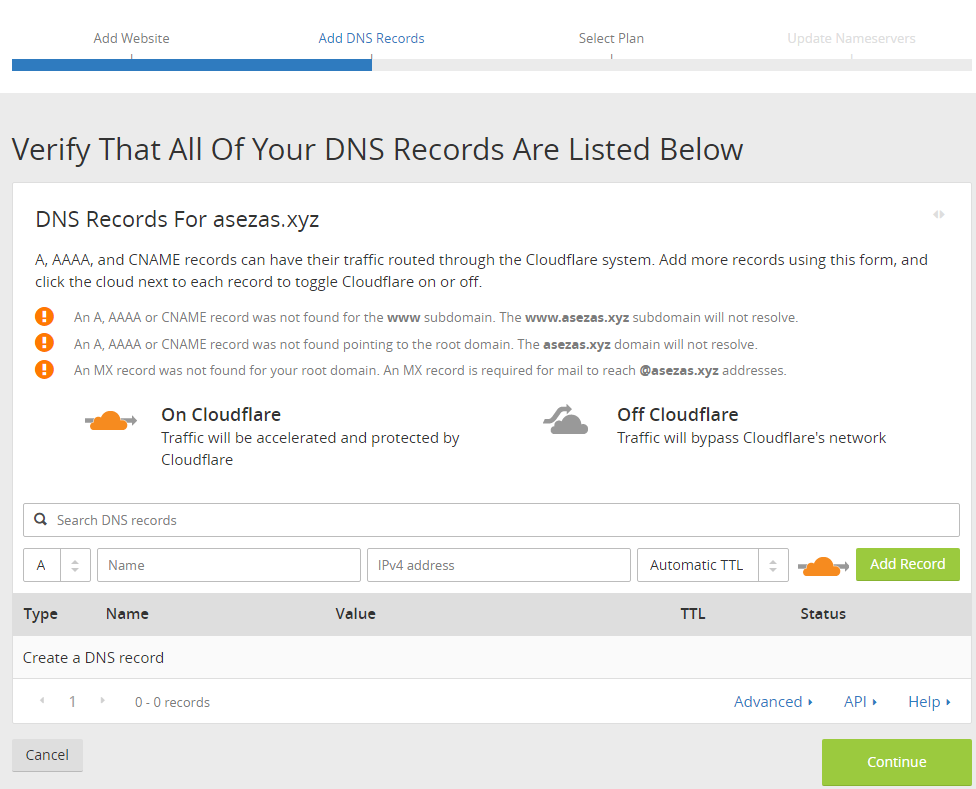
Add your DNS Records. Don’t worry this can be changed later so you can go ahead and skip it if you want.
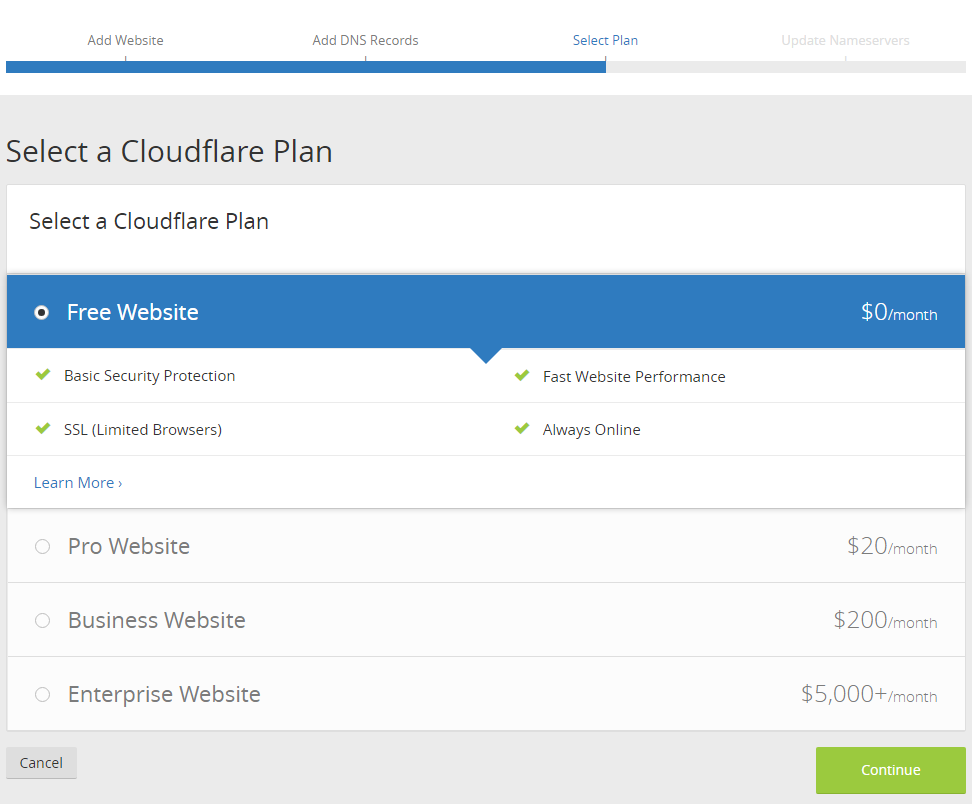
Select your plan. I would say their free plan is sufficient for most people.
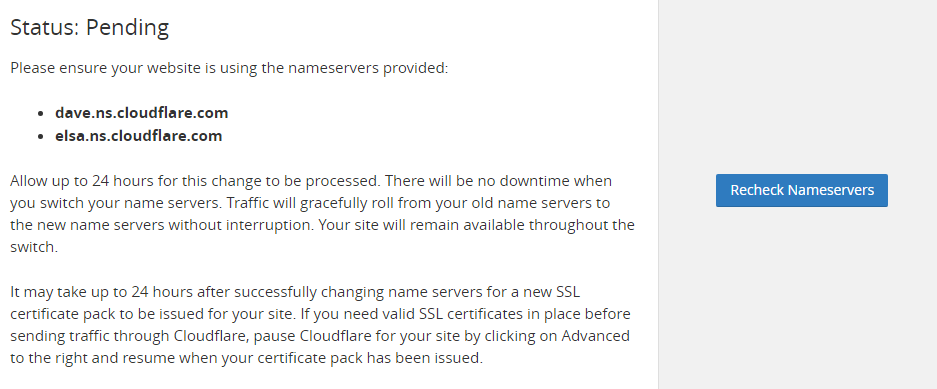
Point your Nameservers to Cloudflare.

For example, if my domain registrar is Namecheap, I would point their Nameserver to the ones given by Cloudflare so they will be able to proxy our requests.
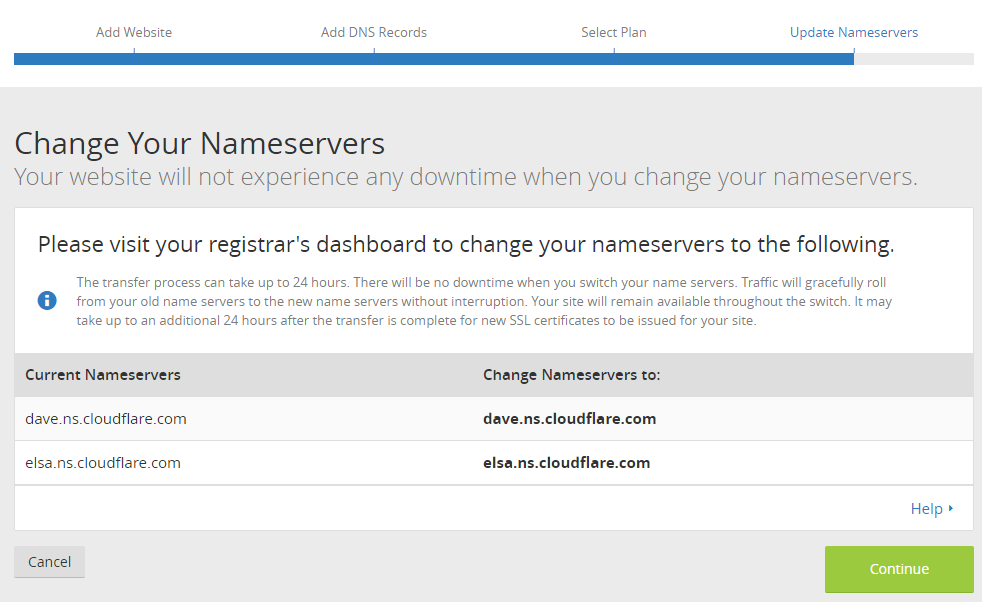
After changing your Nameserver all you have to do is wait for the DNS to propogate.
How do I know if Cloudflare caches my content?

Head over to https://gtmetrix.com and enter your website.

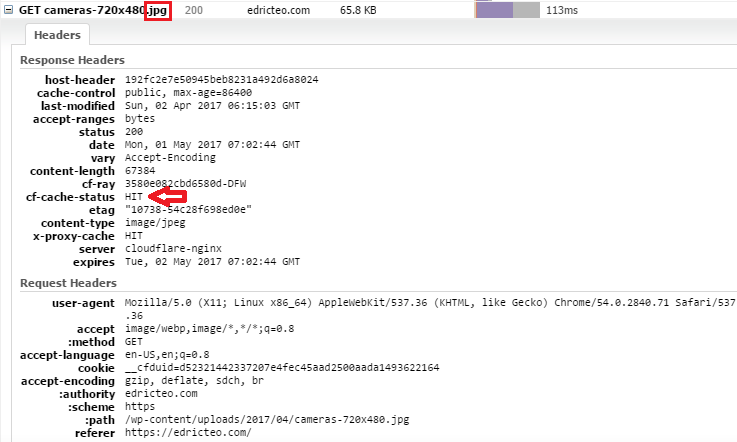
Expand any resources with the extension CloudFlare supports:

css bmp tif ttf docx woff2
js pict tiff eot xlsx
jpg csv eps woff xls
jpeg doc ejs otf pptx
gif pdf swf svg ps
ico pls midi svgz class
png ppt mid webp jar

Check for the response header cf-cache-status and if it shows HIT then you’re good to go.

If it shows MISS then Cloudflare is not caching your resources. You can learn more about the other cache status here.

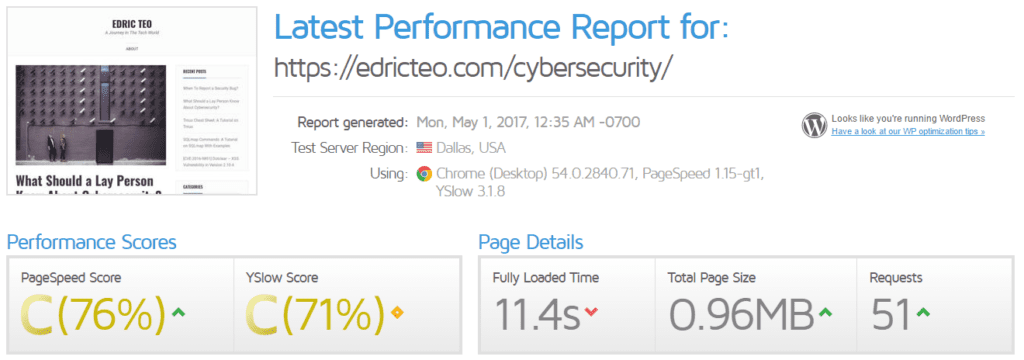
Does Cloudflare really speed up a website and save bandwidth?

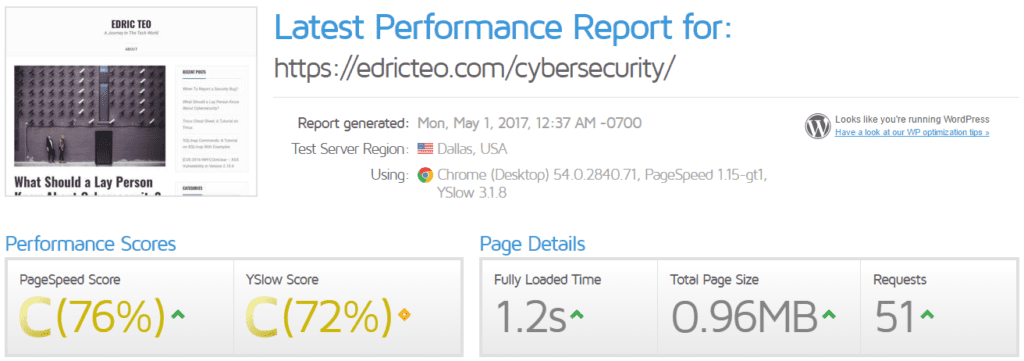
Here are screencaps of before and after using Cloudflare. You be the judge.
What about saving bandwidth? Here is a case study.

Troy Hunt, wrote an article on how he handles huge traffic spikes. The background of this article was that HaveIBeenPwned, a service Troy created was featured on a British TV show. Here is the result of what happened:
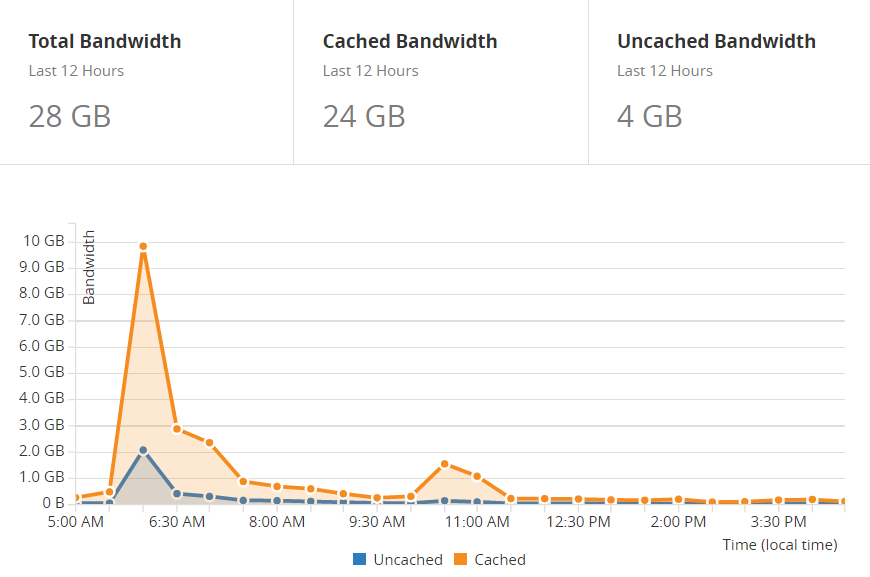
Source: https://www.troyhunt.com/brief-lessons-on-handling-huge-traffic-spikes/

From the graph, you could see that in just 2 hours, Troy peaked at 10GB for cached content. If not for Cloudflare, these requests would be hitting the origin server.

However, you have to realise that since you’re using the free service, expect that you will not be getting the best service.

Cloudflare do not have unlimited storage on their cache server hence even if you have set your expiry to a month, your resource may not be on Cloudflare’s edge server since there are other more active resources being cached.

Conclusion

Cloudflare’s free plan is sufficient for many as it provides excellent features ranging from SSL to improving site speed to reducing bandwidth.

However, all these metrics may vary and differ from others. One of the factors is how optimized your website already is.

An example would be serving unoptimized images, a website that serves images of the highest resolution will result in higher bandwidth savings compared a website serving a scaled down version of the image.

Play around with the settings and find the optimal result for your website.
When To Report a Security Bug

With the rising popularity of bug bounties, I’ve decided to find some bugs online myself. You would be amazed by how vulnerable websites are and how easy it is to find an XSS vulnerability. Try using a simple Google dork like inurl:“.php?id=” and you could definitely find a couple of sites that are vulnerable to XSS.

I had previously hunted for bugs online in hopes of getting some bounties using the openbugbounty platform. In a matter of a few months, I was able to find a little over 1000 XSS. I decided to return to my roots to find XSS in open-source projects.

Nibble Blog

On 26 November 2016, I downloaded Nibble Blog version 4.0.5 for testing. Soon enough I found an XSS on the quote creation page.

The following is the POST request to the server with “quote” as the vulnerable parameter.

POST /nibble/admin.php?controller=post&action=new_quote HTTP/1.1
Host: 127.0.0.1
User-Agent: Mozilla/5.0 (Windows NT 6.1; WOW64; rv:50.0) Gecko/20100101 Firefox/50.0
Accept: text/html,application/xhtml xml,application/xml;q=0.9,*/*;q=0.8
Accept-Language: en-US,en;q=0.5
Accept-Encoding: gzip, deflate
Referer: http://127.0.0.1/nibble/admin.php?controller=post&action=new_quote
Cookie: SOFTCookies7188_sid=S6kc8ML6xKdrxg37P8tvqPZUXmsmzigS; PHPSESSID=16tcqjfi5plvrt4br3s5u5giv0
DNT: 1
Connection: close
Upgrade-Insecure-Requests: 1
Content-Type: application/x-www-form-urlencoded
Content-Length: 152

token=f3050b47c15fcc9eb44b0916a1b06f8dac87d124&quote="><img src="/" />&id_cat=0&tags=&slug=&button_add=Publish

Exploring further shows that there is a plugin system in place. Sweet! More parameters to test.

And sure enough, all the default plugins were vulnerable. Here is a table that summarizes all the vulnerable parameters with their respective plugin.

S/N Plugin
Name
Parameter Name(s)
1 All
plugins
title
2 My
image
caption
3 About name,
about*
4 Google
analytics
id
5 Maintenance
Mode
message
6 Sponsors code
7 Tag
cloud
min_size,
max_size
8 Twitter
cards
creator,
site

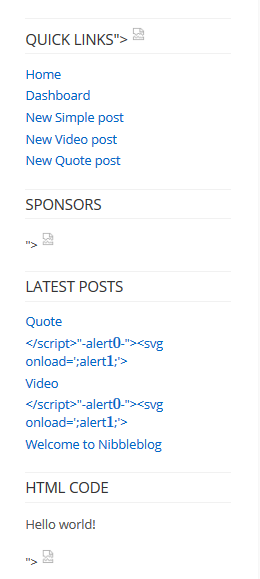
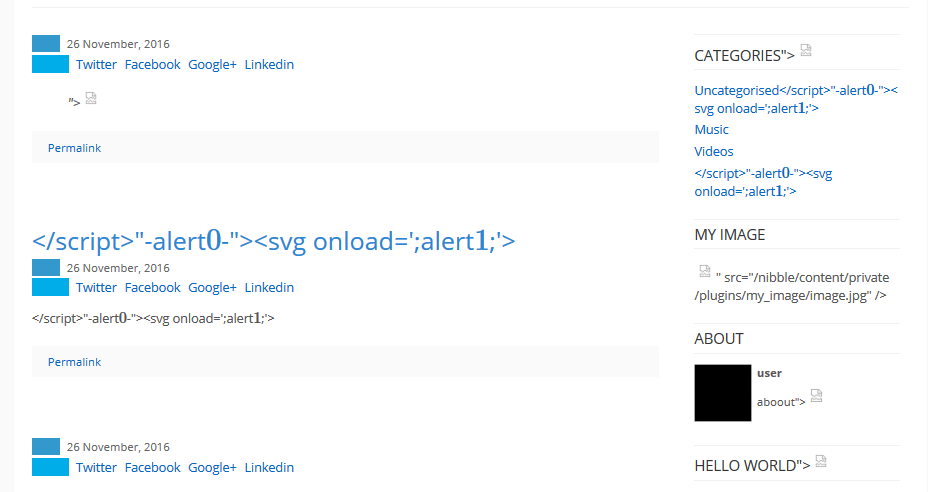
You can see some broken image tags. Each broken tag represents the failure of encoding or sanitization which allows the payload to be interpreted by the browser.

Now let’s move on to Kopage.

Kopage

I chanced upon the Kopage demo version on 20 December 2016.

It was close to midnight, and I was about to head to bed when I triggered an alert box. I was now pumped and had to do some further testing. I downloaded and installed a local copy (version 3.0.1) and an hour later here is what I found.

There are 3 XSS vulnerabilities in Kopage (or at least those that I could find).

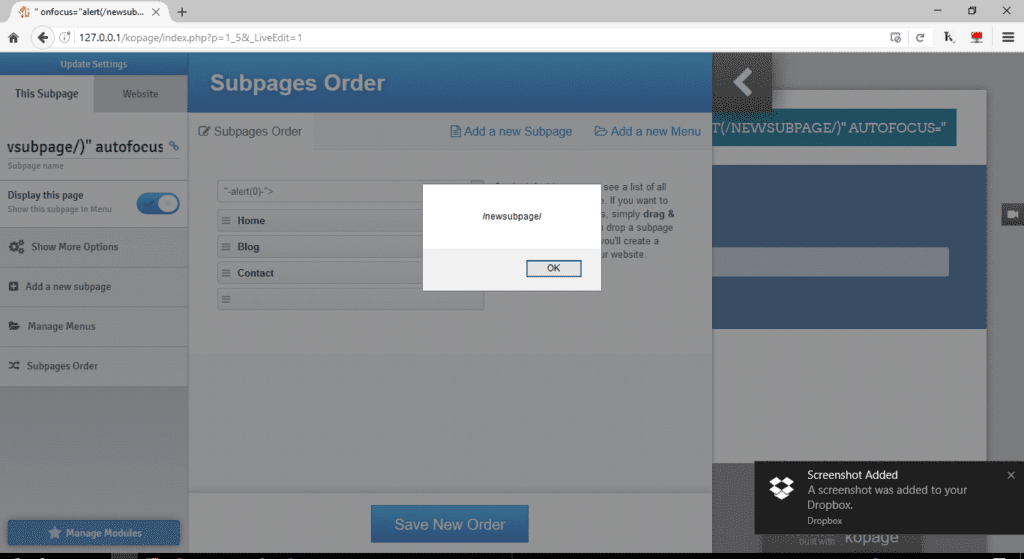
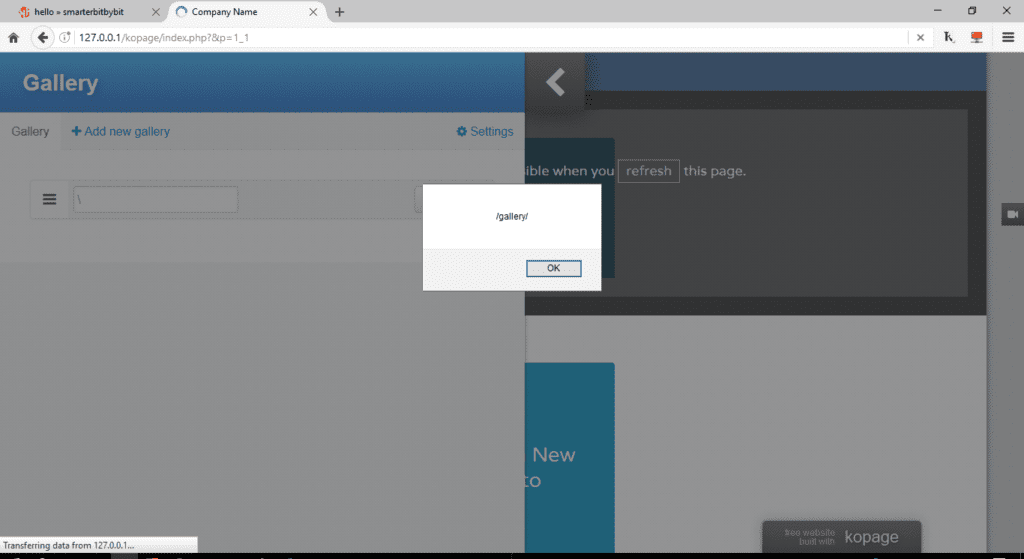
  1. Adding a new subpage
    2. Menu Options
    3. Gallery

What happens after?

I wrote two reports with detailed instructions on replicating the issues and submitted them.

Here are the replies from both owners.

Hi Edric,

I’m checking the exploit, and yes exist, but you need to have access to the admin panel and create a post, anyway, this kind of “vulnerabilities” I think is in all CMS who permit create a post/page, and allow to change the source code of the HTML or I’m wrong ?

-Nibble Blog (29 November 2016)

Edric, thanks for your report. All of these require user to be logged in as admin first, why would website admin want to add any of these to his own website?

-Kopage (21 December 2016)

Noticed what the problem was? These platforms were created for a single user, and therefore the reported vulnerabilities only affect the owner.

Conclusion

Nibble Blog

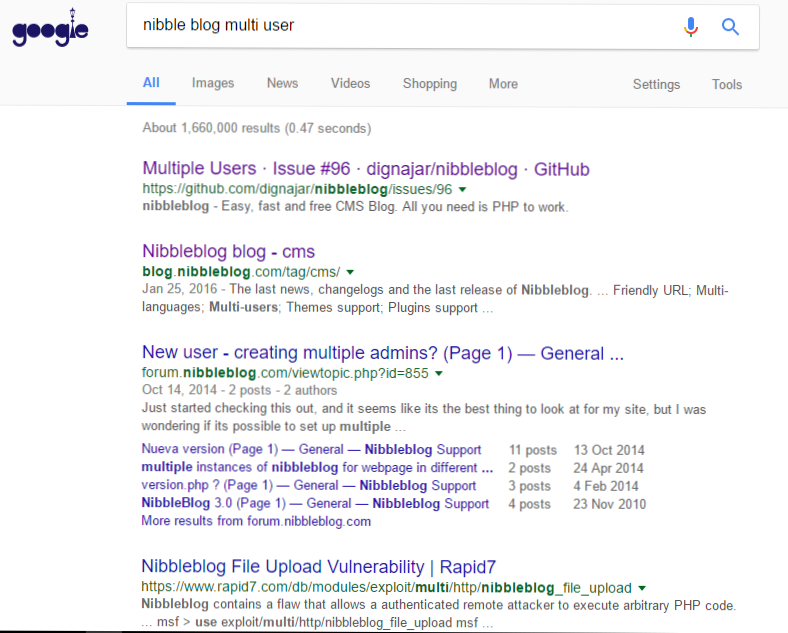
When I received the message from Nibble Blog, I immediately googled “nibble blog multi-user”.

It turns out, someone had requested this feature, and it was coded, but it was not merged into the main branch it was distributed via Dropbox. The link to the thread is here. The newer version seems to have multi-user capabilities, and therefore forking from the version with XSS vulnerabilities should worry the users.

The owner and developer of Nibble Blog have moved to a new project Bludit which supports multi-user.

Kopage

Simon, the co-founder of Kopage requested for the bugs to be fixed before releasing this post. As of now, all the mentioned bugs are fixed and I appreciate his openness of him throughout the process.

Note to self

In the future, make sure that your proof of concept illustrates how a malicious user would exploit the vulnerability. In my case of XSS, it would mean that I would have to be able to privilege escalate by stealing a cookie or keylogging the admin’s password and not just simply providing screenshots of alert boxes.

What Should a Lay Person Know About Cybersecurity?

Cybersecurity is a very broad term. I feel that techtarget.com does an excellent job in describing what cybersecurity is all about.

Cybersecurity is the body of technologies, processes and practices designed to protect networks, computers, programs and data from attack, damage or unauthorized access. In a computing context, security includes both cybersecurity and physical security.

However, in this post, I will be discussing how cybersecurity is integrated into our daily life.

Let’s start off with HTTPS.

Hyper Text Transfer Protocol Secure (HTTPS)

We are familiar that the “s” at the back refers to secure.

To simplify, it means that data that are being transferred between the browser and the web server is encrypted.

You are probably asking. What is encryption?

Encryption is the process of transforming normal text to gibberish-like text:

Uv gurer! Jung lbh ner frrvat abj vf gur qrpelcgrq irefvba bs gur cynvagrkg.

Now head over to this website and enter the above message.

The above is what we call Caeser Cipher. This cipher is taught to students who are first introduced to Cryptography.

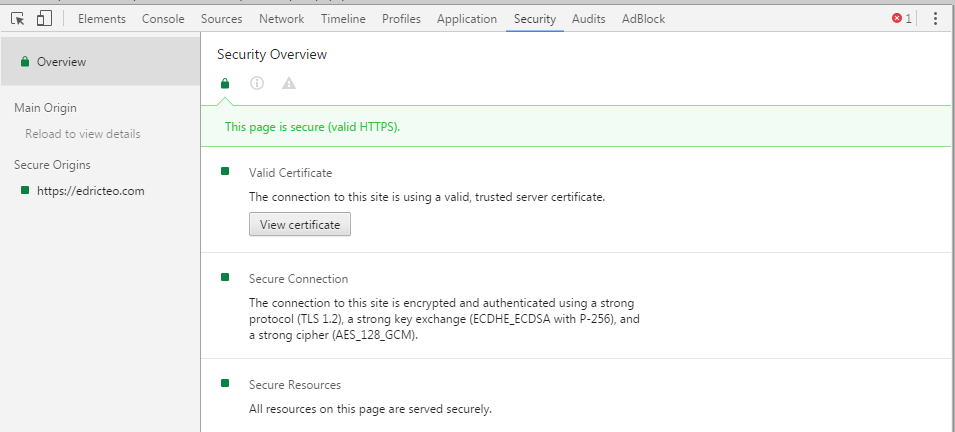
In fact, this site is using AES_128_GCM for its encryption cipher.

On Google Chrome, press the F12 key. Then click on the Security tab located at the top.

So how is this useful?

Imagine you are in Starbucks, connected to their Wi-Fi and you are logging into a banking website.

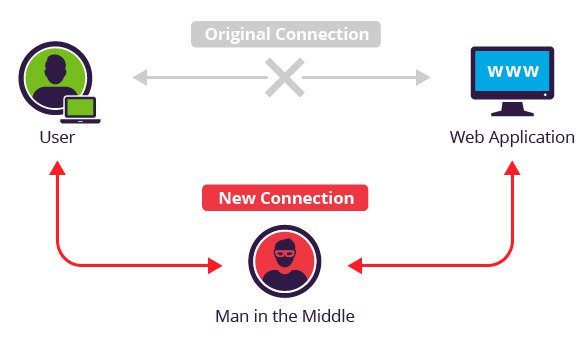
If the banking website did not implement SSL, your password would be submitted in plain text and anyone in the same network is able to sniff the traffic using tools like Wireshark to find out your password. These attacks are commonly known as Man-in-the-Middle attacks.

Source: https://www.incapsula.com

Since we are on the issue on password, let’s discuss this in the next section.

Passwords

Passwords are not stored as plaintext

Did you know that your passwords are not stored as plaintext?

For example, if I have the password in plaintext !P@$$w0Rd and this is stored in the application’s database.

Wouldn’t the database administrator have access to your password?

Instead, 11a8e341603af273205adc2e283c43da is stored rather than _!_P@$$w0Rd.

Hashes are math operations meant to be computed in one way but difficult in reverse. This means that to decrypt a hash, the computing power required is increased exponentially.

11a8e341603af273205adc2e283c43da is an example of the output of a hashing algorithm. There are many types of hashes (the one we used was an MD5 hash, and it is considered to be insecure) and with the increase in computing power available to the consumer market, a newer hashing algorithm makes it even more difficult to reverse the hash.

If that’s the case, how would an application know if you are a legitimate user since they can’t compare the password you typed with the hashed passwords?

Well, they could do the comparison by performing the same hashing algorithm on the password that you typed to log in.

Great. Now even if a hacker were to access the database he won’t be able to see my password right?

Not quite so.

The same passwords are actually not the same

What if two user uses the same password? All the hacker has to do is decrypt one hash and he is able to gain access to multiple accounts same passwords.

There is also another problem.

What happens if you use the same password for all the accounts you created online? By obtaining just one password hash, I could easily compare it with other hashes from data breaches and look out for the same exact hash.

This is where salts come about.

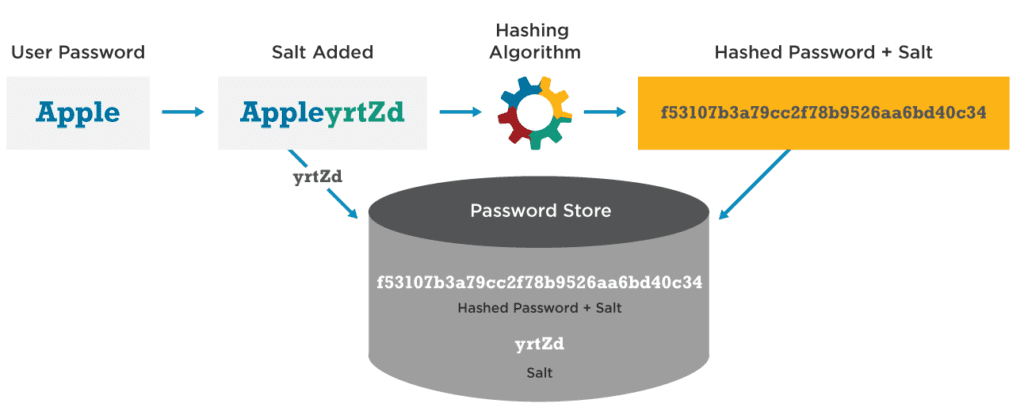
Salts are random strings of characters appended to the back of your password.

The appending of salts is done before going through the hashing algorithm. This way even if two users have the same password, they will have a different password hash.

Here is a great illustration by Wordfence of how a salted-hash password is generated.

By having a salted-hashed password, we can conclude the following:

  1. No one sees your password in plaintext
  2. Two exact same password produces different hashes meaning no one could identify the existence of the same password.

So the next time when you click “Forgot my password” and you see something like this. Consider avoiding the service.

Password managers

Passwords are like underwear: you don’t let people see it, you should change it often, and you shouldn’t share it with strangers.

In the past, I used to have some issues remembering my password. I followed the usual advice of not having the same password and I find myself hitting the “Forgot your password” button every so often.

I then came up with a format type of password. For example,

Last 2 letters of the favorite actor     first 2 letters of the maiden name     2 symbols     last 2 characters of the domain name

With the format, I came out with the following password: totE!`eo. This way I can better manage my password for different websites.

To solve this problem, I started using password managers to help me generate and save my password.

Security question

You can have the most secure password until the bad guys guessed the answer to your security question.

Security questions such as the first pet’s name and best childhood friend are no longer secretive ever since social media bloomed. We constantly throw out information about ourselves that we unknowingly give away the answers to our secret questions.

My solution to this is to give a different answer to the question. For example, if I were to choose the question “Who was your best childhood friend?” I would enter the answer “maryhadalittlelamb”.

Choose a less obvious answer to your secret question!

Giving away my password

I could literally give you the password to my Facebook account right now and you still can’t have access. This is all thanks to Two-Factor Authentication (2FA).

The 2 factors are:

  1. What I know (Password)
  2. What I have (Token)

By giving you my password, you could easily get past the first factor. However, you are unable to get past the second factor which is the token. These tokens could easily be generated using an application like Google Authenticator or Authy provided that the web application supports 2FA.

In large companies where physical security is a concern, 2FA is also used. The first factor is usually a pin or code of some sort to cover the “what I know” aspect and the second factor could be in a form of an NFC card or Biometric scanner to cover the “what I have” aspect.

Different names for different virus

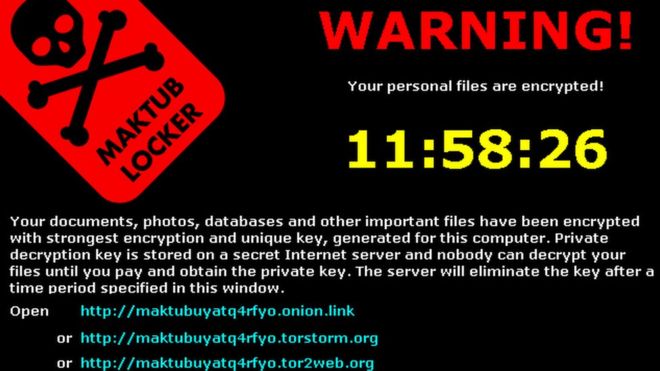
First of all, the virus is the wrong term for generalization. In fact, the virus is a subset of a larger group called Malware(malicious software) which also includes trojans, adware, worm, rootkit, and ransomware. Terms are given according to their properties and how they behave. This is to allow the infosec sector to differentiate and reference the correct malware type.

For example, if you were to send a screenshot of the following to an IT security consultant.

Source: http://www.bbc.com

He could immediately identify its a ransomware and advise you based on his expertise on ransomware or direct you to resources about ransomware.

To understand more about the different types of malware you can read more here.

Getting paid to hack

Not every hacker hides in a basement wearing a hoodie. Infosec consultants are working professionals hired to “hack”(or what we like to say, find vulnerabilities in) websites. This process is known as penetration testing where explicit terms and conditions are drafted to ensure that the consultant has every right to test your system legally.

The engagement usually ends with a report or debrief to the management and it may also include assistance of fixing security bugs.

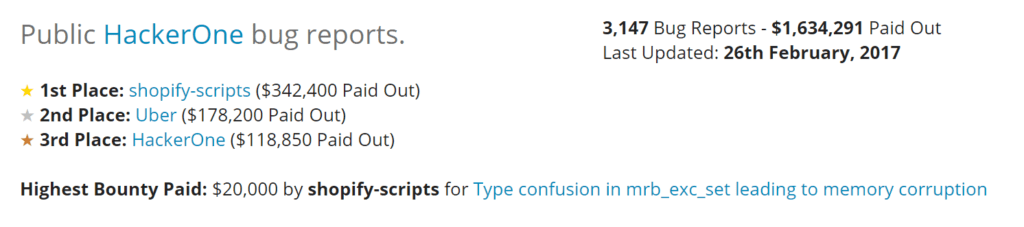
There is another group called bug bounty hunters and they find security bugs online for bounties. Platforms such as hackerone and bug crowd are created to facilitate the reporting and triaging of bugs.

Since more and more companies are participating in bug bounty programs, bounties are awarded almost every day.

As of 26th Feb 2017, $1,634,291 was paid out to participants. Considering the fact that HackerOne was launched in 2012, the amount paid out within that 5 years is tremendous.

Domain Name, your personal data is at risk

In my previous post, I discussed the considerations before starting a website that includes your domain name.

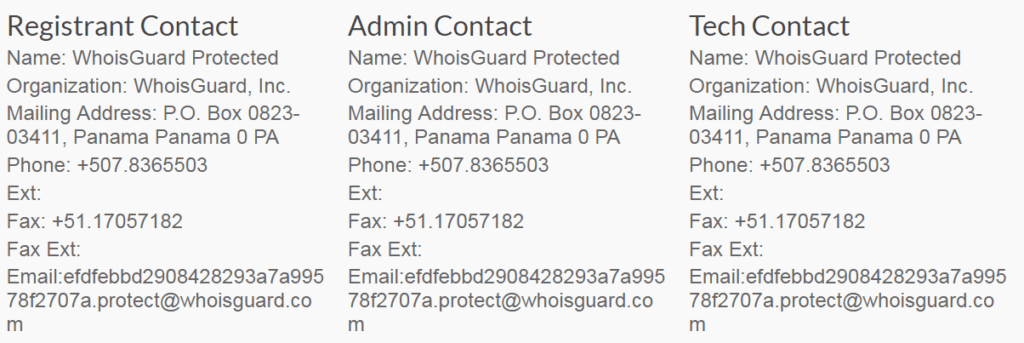
During the registration of a domain name, you are required to fill in contact details such as registrant contact, admin contact and tech contact. Most people include their personal addresses without knowing that it will be on the internet.

Here is an example of the domain lookup for edricteo.com

I have subscribed to WhoisGuard by Namecheap therefore, the details are not my actual addresses.

How does someone get in contact with me then?

You will still receive emails if someone contacts you via the generated email above.

So remember, if you were to create a blog. Remember to look up your own domain.

You are being tracked all the time

Right now as you are reading this you are being tracked by Google and New Relic.

Information is power

Tracking is required to collect data for improvements. For example, Google allows webmasters to implement Google Analytics on their website so that they can track their audience. By doing so, it gives the content creator a better sense of his audience and could alter his content to better serve their audience.

You can prevent such tracking by installing add-ons such as GhosteryPrivacy Badger or simply disable scripts. However, I won’t recommend doing so as it may affect your browsing experience.

That’s all for this post as I attempt to illustrate certain cybersecurity concepts that affect you directly.