If you were directed to this post by me, chances are your private information such as a home address, telephone, and mobile phone is publicly available online.
Over the years, I’ve been contacting bloggers privately via email to warn them about this issue. Some heed the advice while others ignored it.
I am in no way an expert in the field of privacy but I personally feel uncomfortable knowing that someone else could easily know where I live.
What is a domain name?
A domain name is usually mapped to a web server’s IP address so that we don’t have to remember the exact IP address.
That’s it. That’s the sole purpose of a domain name.
What is the problem?
While registering a domain, we usually need to fill in 4 parts:
Registrant Contact Information
Administrative Contact Information
Technical Contact Information
Billing Address
Each of these sections serves a different role in a corporate environment however, individuals usually have the same information for all 4 parts.
This information is publicly available and anyone can do a WHOIS lookup using online free services.
Now what?
Hide your personal information
Privacy protection usually comes as an add-on that cost a couple of bucks.
It is also important to note that some top-level-domain (TLDs) does not allow domain privacy while some TLDs such as .sg have domain privacy by default.
I have gathered the most commonly used registrar and have provided links to their respective article/information page on hiding your personal information:
Cross-Site Scripting, commonly known as XSS occurs when an attacker utilizes a web application to send harmful code, typically in the form of a browser-side script, to a different end user. In simple words, the danger of XSS arises when a web application incorporates user input into its output without proper validation or encoding, creating an opportunity for an attacker to execute harmful scripts.
How XSS Works
The mechanism behind XSS is relatively straightforward but dangerous. It exploits the trust a user has in a particular website. When a malicious script is sent via an XSS attack, the user’s browser has no way to discern that the script is not to be trusted and executes it. Since the script appears to originate from a trusted source, it can access sensitive data like cookies, session tokens, or other critical information stored by the browser.
Types of XSS Attacks
Cross-Site Scripting (XSS) attacks are a prevalent issue in web security. They exploit vulnerabilities in web applications that fail to adequately sanitize user input. Let’s delve into each type you’ve mentioned, offering more details and examples.
1. Reflected XSS Attacks
Reflected XSS attacks occur when a web application or API sends user-supplied data back to the browser without proper validation or escaping. This vulnerability is often found in search engines, forms, and other mechanisms that reflect user input as part of their immediate response.
Imagine a search function on a website that directly includes user input in its response. An attacker could craft a URL with a search term that includes a malicious script. When a user clicks on this link, the script executes in their browser. For instance, the URL might be http://example.com/search?q=<script>alert('XSS')</script>. If the search term is reflected as-is in the search result page, it would execute the script.
2. Stored XSS Attacks
Stored XSS attacks occur when the malicious script is permanently stored on the target system, such as in a database, message board, comment field, or any other location where data is stored. Most application sees data as it is (regardless of whether they are malicious), and therefore will simply store the payloads. Each time users access this data, the script gets executed in their browser.
Consider a forum where users can post messages. An attacker posts a message containing a script, such as <script>fetch('/steal-cookie').then(response => document.write(response))</script>. Every user who views this message will execute the script, potentially leading to cookie theft or other malicious actions.
3. DOM-based XSS
In DOM-based XSS, the attack payload is executed as a result of modifying the Document Object Model (DOM) of the web page in the client side, often in response to some user action like clicking a link or submitting a form. This type of attack occurs entirely in the browser and does not involve server-side processing of the malicious data.
Consider a web application that uses JavaScript to process and display URL parameters. An attacker could manipulate the URL to include a script, like http://example.com/page.html#<script>alert('XSS')</script>. If the JavaScript code naively uses the fragment of the URL to modify the DOM, it could execute the script.
4. Blind XSS
In blind XSS attacks, the malicious script is stored and executed outside the immediate web application context. It often targets administrators, moderators, or support staff who interact with the data through a different interface, like a backend CMS or support tool.
An attacker submits a support ticket with a script embedded in it. This script remains dormant until a support staff views the ticket in their internal support system. When viewed, the script executes in the context of the staff’s session, potentially leading to account compromise or data leakage.
5. Alternate XSS Syntax
Attackers often use creative syntax to bypass filters and execute scripts. This can include using non-standard tags, event handlers, or exploiting browser-specific behaviors.
Instead of the classic <script> tag, an attacker might use an image tag with a JavaScript event handler, like <img src=x onerror=alert('XSS')>. When the browser attempts to load the image and fails (since ‘x’ is not a valid image), the onerror event triggers the execution of the script.
Consequences of XSS Attacks
The impact of XSS attacks can range from mere annoyances to severe security breaches. The most serious consequences involve hijacking a user’s session, allowing attackers to impersonate the user and gain access to sensitive data or functionalities. XSS can also lead to content spoofing, where attackers manipulate the content on a website, and in extreme cases, deliver malware or perform other harmful operations.
Here are some real life examples of such attacks (via bug bounty):
In GitLab 15.0.0, a XSS vulnerability was discovered in the Customer Relations feature, where injecting a script into a contact’s name fields triggers JavaScript execution when using quick commands like /add_contacts or /remove_contacts. [link]
An attacker can exploit a vulnerability in Uber’s readme.io documentation pages to perform a stored XSS attack, potentially hijacking the accounts of developers viewing the affected pages. [link]
Shopify rich text editors allowed data: URLs as image sources, enabling stored XSS via SVG images in product descriptions, potentially compromising the /admin area with little user interaction. [link]
Identifying XSS Vulnerabilities
1. Testing for Reflected XSS
Input Validation: Experiment with various inputs in query parameters. Include typical XSS payloads like <script>alert('XSS')</script>. If the script executes, it’s a clear sign of vulnerability.
Observe Responses: Pay attention to how the application responds to your inputs. Does it filter or escape special characters? If not, it might be susceptible to XSS.
Use Browser Developer Tools: These tools can help you see if your input is reflected in the page’s source without proper sanitization.
2. Testing for Stored XSS
Persistent Input Testing: Submit scripts through forms or input fields that store data, such as comment sections or user profiles. Later, check if these scripts are executed for anyone viewing the stored data.
Data Handling: Analyze how the application handles and stores user inputs. Are inputs sanitized before storage? If stored data is displayed without proper encoding, it could lead to Stored XSS.
Test Across User Accounts: Use different accounts to test if a script injected by one user affects other users, indicating a stored XSS issue.
3. Testing for DOM-based XSS
Client-Side Code Review: Scrutinize the JavaScript or client-side code. Look for instances where user input is directly included in the DOM.
Dynamic Testing: Modify DOM elements on the fly using tools like browser consoles to see how the application reacts to changes in the DOM.
Trace Data Flow: Track how data flows from sources (like URL parameters) to sinks (where data is output in the DOM). Unsafe data handling here can lead to DOM-based XSS.
General Tips
Use Automated Tools: While tools like Nessus and Nikto are helpful, they might not catch everything. Use them as a starting point but don’t rely solely on them.
Manual Code Review: Complement automated tools with a manual review of the code, particularly focusing on how user inputs are handled.
Payload Variations: Use a variety of XSS payloads. Some applications may filter basic scripts but fail against more sophisticated or encoded payloads.
Consider Context: The effectiveness of XSS payloads can depend on where in the HTML or JavaScript they are injected. Context matters a lot in XSS exploitation.
Testing Environment: Always test in a safe and legal environment, preferably a test instance of the application you have permission to test.
Prevention and Mitigation Strategies
1. Input Validation and Sanitization
Principle: Do not trust any user input. Validate it against a set of rules (like type, format, length) and sanitize it to remove harmful elements.
Example Code:
const express = require('express');
const xss = require('xss');

const app = express();
app.use(express.urlencoded({ extended: true })); // for parsing application/x-www-form-urlencoded

app.post('/submit', (req, res) => {
    // Sanitize the user input
    const sanitizedInput = xss(req.body.userInput);

    // Process the sanitized input (e.g., store in a database, display back to the user, etc.)
    // For demonstration purposes, we'll just send it back as a response
    res.send(`Sanitized Input: ${sanitizedInput}`);
});

const PORT = 3000;
app.listen(PORT, () => {
    console.log(`Server running on port ${PORT}`);
});
2. Output Encoding
Principle: When displaying user input, encode it to prevent it from being executed as part of the webpage.
Example Code:
<?php
$userInput = "<script>alert('XSS Attempt');</script>";

// Encoding the user input before outputting it
$safeOutput = htmlspecialchars($userInput, ENT_QUOTES, 'UTF-8');

// Outputting the encoded data
echo "Safe Output: " . $safeOutput;
?>
3. Using Security Headers
Principle: Implement HTTP headers to instruct the browser on how to safely handle the content.
Implementation:
Content-Type with charset defined ensures the browser interprets the content in the intended format.
X-Content-Type-Options: nosniff prevents the browser from MIME-sniffing a response away from the declared content-type.
This can be implemented in web server configurations or via server-side scripting.
4. Content Security Policy (CSP)
Principle: CSP allows you to specify which resources can be executed or loaded on the webpage.
Example:
A basic CSP header: Content-Security-Policy: default-src 'self'; script-src 'self' https://trusted-source.com;
This CSP only allows scripts to be loaded from the same origin and a trusted source.
Overview: This is a comprehensive guide covering various XSS prevention techniques. It includes details on properly handling data in HTML, JavaScript, CSS, and URL contexts.
Application: The cheat sheet provides specific code examples and best practices, like using appropriate escaping/encoding libraries and techniques depending on the context in which data is output.
Additional Best Practices
Use Frameworks that Automatically Escape XSS: Many modern web frameworks have built-in mechanisms to prevent XSS. For instance, React automatically escapes content unless explicitly told not to.
Regular Security Audits: Regularly review and update your practices to combat new XSS techniques.
Educate Developers: Ensure that your team understands the importance of these security measures and how to implement them correctly.
Conclusion
XSS poses a significant threat to web security, capable of compromising user data and undermining the integrity of web applications. Understanding its mechanisms, types, and consequences is crucial.
Equally important is the implementation of effective prevention strategies, such as input validation, output encoding, and adhering to security best practices. Regular security reviews and testing play a vital role in identifying and mitigating XSS vulnerabilities. By adopting a proactive and informed approach to web security, organizations can significantly reduce the risk of XSS attacks.
A static web page is often HTML file that is served as it. It means that whatever is uploaded is displayed. No logic or any other server-side codes.
Those who have been following me know that I changed my blogging platform a couple of times. I’ve used Tumblr, Ghost, and just before migrating, WordPress. I’m someone who hates change but ironically every time I changed or moved to a new platform something was missing.
Tumblr was free(and had support for custom domains) but had tons of additional analytic scripts which makes your site clunky.
Ghost was great, lightweight, had an excellent editor, and great in-built seo, however, the hosting was expensive at $19/month, and as a student that wasn’t feasible. I self-hosted ghost using this script but whenever there is a new update, I’ll have to go through the process of backing up my blog, wiping my VPS, and reinstalling the platform using the script.
WordPress is still considered to be the best blogging platform for those who are starting out. It has an amazing plugin system that takes care of most of a blogger’s concerns (security & SEO), great security(subjective), and a supportive community. The problem was still the same, try finding cheap hosting for WordPress. Even shared hosting isn’t sustainable since this blog isn’t monetized (and I’m still a student).
I’ve literally run out of a good blogging platform that caters to my need.
Considerations
Before this migration, I had performed some serious research and decided that the current setup was best for me.
Here are some of the considerations:
Cost
Speed
Workflow
Future-proof
Cost
I’m a student, I’m an Asian. I need free stuff.
Hosting a VPS on a ram node was honestly affordable. I was able to use ghost comfortably until the update rolled in (they are currently working on a CLI update feature).
Hosting WordPress is a HARDCORE business. I mean seriously. Google “WordPress hosting” and you will be flooded with options with different reviews. My previous host was Siteground and I have no complaints with their service. This blog hosted on it was fast, the user interface was simple and navigable, and overall a great host. The cheapest/smallest plan cost $3.95/month(annual subscription) for the initial purchase; on renewal, it jumps to $9.95. That’s a 2.5x multiplier! It’s only worth it if you manage to monetize your site within that one year.
At this point, the only thing that I want to be paying for is my domain name.
Speed
Who wants to visit a slow site?
There are many factors that affect a site’s speed. I’ll be eliminating them by shifting them to a static site. Previously, I had no problems with my website and I intend to keep it that way.
I made a review on Cloudflare a while back and it still stands true that they still provide amazing services for free. Yes, you heard it. HTTPS/2, CDN caching, asynchronous javascript, and stunning analytics all for free(this is not an ad).
I’ve consistently maintained a relatively fast site using Cloudflare, and until their free tier caching deteriorates, I will continue using it.
Good job Cloudflare.
Workflow
All I’m doing is writing stuff and getting my thoughts out there. The traditional blogging platform is pretty straightforward, create a new post using the GUI and click on publish to get your words out.
However, I’m using a Hugo, a static site generator, the usual workflow using a static site generator would involve using the terminal and a plain boring text editor. Yuck.
I’ve decided to use Gitlab pages with Hugo, and Forestry.io for editing.
Gitlab pages is similar to GitHub pages, the former is my choice as they offer unlimited private repository.
As for editing, Forestry.io is compatible with both Gitlab and Github In addition, they recently received some funding (suggesting further development). And most importantly, their support even for the free tier is superb.
Future-proofing
I’ve done two major migrating, Tumblr → Ghost, Ghost → WordPress. It was time-consuming and outright unproductive. In the future I might go back to Ghost, hence the future-proofing. I need to be working with a platform that supports markdown.
My setup is independent of each other and I’m able to swap them out anytime without affecting the setup.
Hosting
DNS
CDN
Platform
Gitlab
Cloudflare
Cloudflare
Hugo
Migrating to Hugo
The migration to Hugo was a pleasant one, using this free WordPress plugin that does a decent job.
We first have to install Hugo, and I must say they have amazing documentation on how to get it done. My Hugo setup was working in literally minutes.
It’s similar to installing Python on windows.
Download the executable
Add a path to the executable in the environment
Upon installing try calling help to see if it’s correctly installed.
hugo help
Once Gitlab is correctly installed you can create a new site using:
hugo new site blog
I used this video as a quick start-up. A word of advice, when using a static site generator remember that it is a generator and you are passing the configuration to Hugo(in this case) to generate the site to your liking.
Uploading to Gitlab
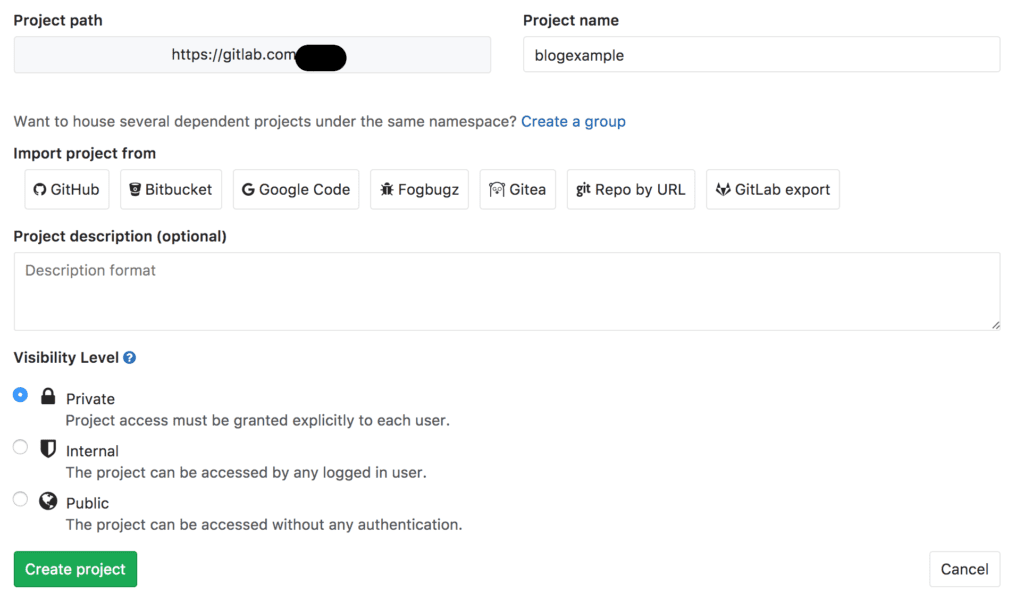
Create a new repository by heading over to https://gitlab.com and logging in.
Play around with Hugo and make sure that the generated site is what you expect because when we upload these files and config to Gitlab, they will be the ones building your static site.
Almost immediately after you push the files, Gitlab’s pipeline will start building your site. Pay attention to the errors and fix them accordingly. I spent more time than I should have here simply because I was going after the spray and pray methodology instead of reading the error.
Forestry.io is incredibly easy to use. Just head over to https://forestry.io/docs/getting-started for a tour, and if you require any additional help (I doubt so), chat with them using the chat feature.